Share this page


History tab
The History tab displays a table containing the results of a History command. Each row lists an AccuRev transaction that created a new version of the element.
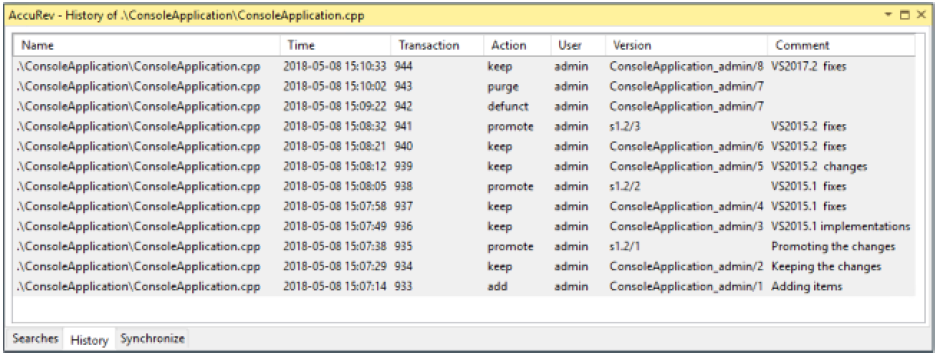
Table columns
The following columns are displayed in the History tab:
| Column | Description |
|---|---|
| Name | Element's pathname within the workspace. |
| Time | A timestamp indicating when the transaction took place. |
| Transaction | The unique number (within this AccuRev depot) of the transaction. |
| Action | The kind of AccuRev transaction: keep, promote, etc. |
| User | AccuRev username of the user who performed the transaction. |
| Version | Unique version-ID of the element version that was created in this transaction. |
| Comment | User-supplied comment for this transaction. |
Running AccuRev commands
You can select one or two transactions from an item’s history, then invoke an AccuRev command from the selection’s context menu:
| Command | Description |
|---|---|
| File in the Workspace | Compares the version in the selected transaction with the version currently in your project. |
| Other Version | Compares the versions created in the two selected transactions. |
| Checkout Version | Replaces the version in your workspace with the version in the selected transaction. |
| Show Transaction | Pops up another window, Transaction History, showing the complete contents of the selected transaction. |