
Share this page


One of the main functions of the verification process is to ensure that the project database contains valid data. The verification process helps you find and fix problems.
Some fields (or a combination of fields) must be unique in given tables. This constraint is enforced by the creation of a unique index on these fields. For example, the combination of fields TS_SUBJECT and TS_NAME, which represent the ID of the test's parent folder and test name, must be unique. It is not possible to create two tests with the same name under the same folder. In rare cases, a corrupted database contains duplicate values in these fields.
Problem: The verification process checks that all unique indexes exist (and therefore enforce unique values). If the verification process finds duplicate values, it does not permit the upgrade to run on the project.
The verification report specifies the fields in which there are duplications and number of duplicate values found, as shown below.

Solution: Automatic Repair. Run the repair process to automatically handle the duplicate values. The repair process renames the duplicate values to resolve the problem.
Most tables have a unique primary key, usually a unique single column. If there are duplicate values in this field, the primary key is not created.
For example, in a table called test, the column TS_TEST_ID represents the test ID, which is unique. In rare cases, a corrupted database contains duplicate IDs.
Problem: The verification process checks that all IDs in a table are unique. If it finds duplicate IDs, it does not permit the upgrade to run on the project.
The verification report specifies the fields in which there are duplicate items and values, as shown below.
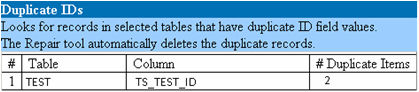
Solution: Automatic Repair. The repair process automatically deletes one of the records with a duplicate ID.
Caution: This option assumes that the entire record is duplicated, and that the duplicated record is not accessible from the OpenText Application Quality Management user interface. Because there can be exceptions, we recommend that you use this option only after verifying manually that this record deletion will not cause data loss.
The verification process checks four different entity trees (hierarchical representation of entities):
-
Test Plan tree
-
Business Components tree
-
Requirement tree
-
Test Lab tree
The verification process checks that the data in the tree tables is correct.
Caution: Do not manually fix any problems related to tree data. The repair process fixes them automatically.
Problem: The verification process checks for the following types of problems:
-
Corrupted Path. This is an internal OpenText Application Quality Management field that contains a string that represents the order of each node in the tree.
-
Wrong Number of Children. This is an internal OpenText Application Quality Management field that contains the number of children for each node in the tree.
-
Orphan Records in Trees. By definition, orphan records do not have parent records. As a result, you cannot access them through the OpenText Application Quality Management user interface.
Solution: Automatic Repair. Run the repair process to automatically fix any problems related to tree data.
Caution: Before beginning the automatic repair, review each orphan record carefully. If the verification process finds an orphan record, it deletes it (and all its descendants) from the tree automatically.
Views
Database views can contain a warning about extra views.
OpenText Application Quality Management schemas should contain only the views that are defined in the schema configuration file.
Problem: If the verification process detects extra views that were added manually to the schema, it displays an Extra Views warning. Adding extra views on top of the schema is not supported and could cause problems.
Note: This problem requires manual repair. The repair process cannot fix it.
Solution: Do one of the following:
-
Change the Schema. If you use the view, copy it to a different schema. If you do not use the view, delete it. Before taking either action, back up your schema and consult your database administrator. For details, see Change the database user schema.
-
Use the Exception File.
Note: Not recommended: Instruct the upgrade to ignore this problem.
The verification process checks for entity data that is missing corresponding parent data. For example, the following entities might be missing corresponding test configurations or test criteria:
-
Test configuration coverage
-
Criteria coverage
-
Run criteria
-
Runs
- Test instances
Caution: Do not manually fix any problems related to orphaned entities. The repair process fixes them automatically.
Problem: In version-controlled projects, deleting a test configuration or test criteria did not delete corresponding entities after checking in. This caused incorrect coverage calculation.
Solution: Automatic Repair. Run the repair process to automatically fix any problems related to orphaned entities created by this problem.
The verification process checks for data that is missing. For example, the following entities might be missing:
-
Test configurations
-
Test criteria
Caution: Do not manually fix any problems related to missing entities. The repair process fixes them automatically.
Problem: The upgrade process can detect that certain entities are missing based on information that exists in related tables.
Solution: Automatic Repair. Run the repair process to automatically fix any problems related to missing entities created by this problem.
The verification process checks that all of the fields of List type are associated with a list.
Problem: If a list and/or its values are missing, the verification process generates a warning about missing lists or missing list values.
Solution:
Run the repair process to create the missing list and/or its values.
Missing lists are re-created with the name: AUTO_GENERATED_LIST_NAME_<unique_number>
After running the repair process, do the following in Customization > Project Lists:
-
Rename any lists whose names are prefixed by AUTO_GENERATED_LIST_NAME_.
-
If necessary, add any list values that are missing.
Tip: Although you can use the repair process to add these objects, we recommend that you contact OpenText Support to make sure that the missing objects are not just symptoms of a bigger problem.



