
Share this page


Prerequisites
-
Ensure that the OpenText Application Quality Managementserver is installed and running.
-
Ensure that the web server, either Apache or IIS, is installed and running.
Note: It is recommended to install the web server and the OpenText Application Quality Management server on separate machines.
- Configure the web server as a reverse proxy server. For details, see Configure web server as reverse proxy.
- Disable IPv6 stack on the OpenText Application Quality Management server host using the operating system's network tool. This will improve communication performance between the IPv6 client and the ALM server. (Jetty 5.x does not support IPv6.)
- Determine how the users will log in to OpenText Application Quality Management using external authentication (for example, using an email address), and ensure that this information is present in the user details in Site Administration. At the end of this process, the site administrator must be able to log in to OpenText Application Quality Management using external authentication. Only then can other users log in to OpenText Application Quality Management using external authentication.
- If you are using LDAP, import the LDAP users.
Recommended configuration:
For the list of supported system environments, see the Support Matrix.
Web Server system requirements:
|
Operating System |
Web Server |
|---|---|
| Windows |
|
| Linux |
Apache 2.4 or later |
Make sure you have the following information about the host on which you are configuring smart card authentication or SSO: Server host name, server operating system type, and web server type (IIS or Apache).
Note: We recommend configuring the firewall so the only servers allowed to log in to the Jetty port are the reverse proxy's machine (IIS or Apache) or the LoadRunner Enterprise server machine.
Segmented networks configuration:
OpenText Application Quality Management is certified in the following topology:
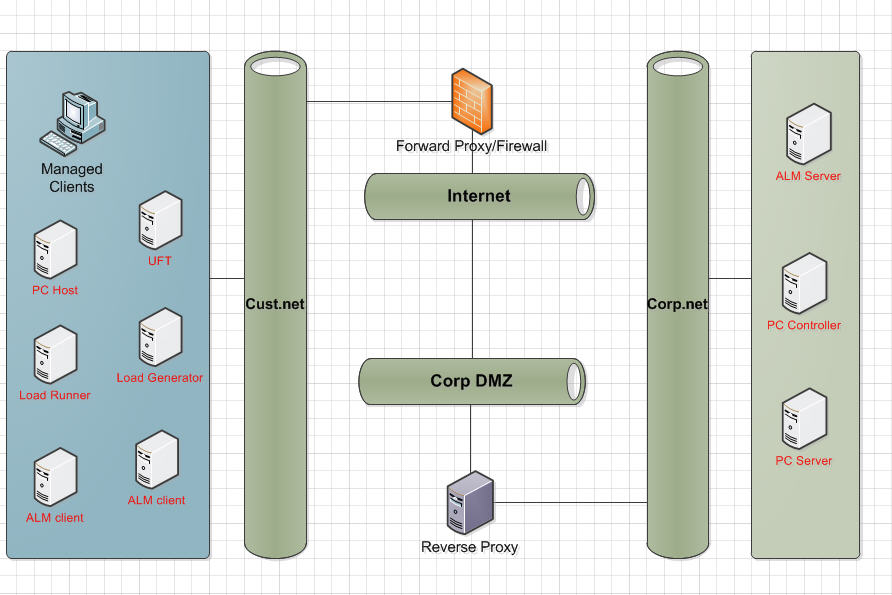
When OpenText Application Quality Management clients are located in a different network segment from the OpenText Application Quality Management server and require a forward proxy to access outside the segment, the OpenText Application Quality Management server is behind the reverse proxy or load balancer, and both proxies require Basic or NTLM authentication, following are the requirements for the proxies:
- The forward proxy and the reverse proxy must return different error codes.
- The forward proxy must support the 407 error code and the reverse proxy must support the 401 error code.
- The forward proxy must pass the authentication headers forward.
Note: You may experience problems if your topology does not meet these requirements.



