
Share this page


External Authentication
OpenText Application Quality Management supports external authentication. This section contains information about external authentication systems, such as Smart Card Authentication and Single Sign-on, and how to configure these systems to work with OpenText Application Quality Management.
Overview
OpenText Application Quality Management supports external authentication, where a reverse proxy positioned in front of OpenText Application Quality Management is configured to support external authentication. After the user is authenticated by the reverse proxy, the authenticated user details are passed to OpenText Application Quality Management, which completes the authentication and authorization process.
For example, a user who passes the reverse proxy authentication but does not exist in OpenText Application Quality Management will be denied access to OpenText Application Quality Management. A user who passes the reverse proxy authentication but does not have permissions to enter specific parts of OpenText Application Quality Management, will be denied access to those parts, such as Site Administration or Lab Management. Otherwise, the login process will complete and the user will enter OpenText Application Quality Management.
Smart Card Authentication Overview
Smart cards are physical devices used to identify users in secure systems. These cards can be used to store certificates that verify the user's identity and allow access to secure environments. Currently, OpenText Application Quality Management supports one type of smart card authentication, CAC (Common Access Card).
OpenText Application Quality Management can be configured to use these certificates in place of the standard model of each user manually entering a user name and password. You can define a method of extracting the user name from the certificate stored on each card or use the system defaults.
When OpenText Application Quality Management is configured to work with smart cards, users can only log in using a smart card. The option of logging in by manually typing in your user name and password is locked for all users.
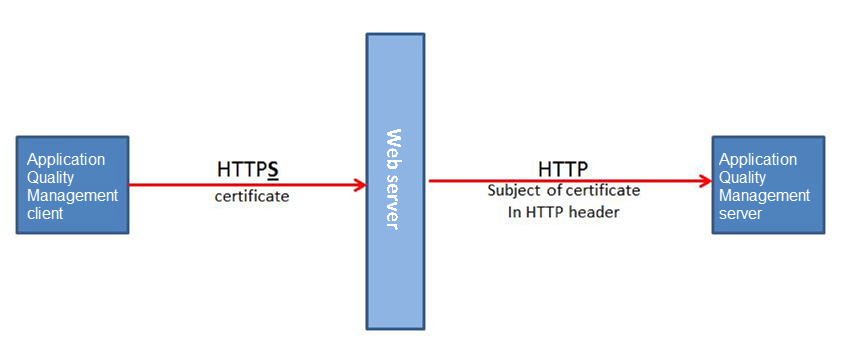
The following figure illustrates the smart card authentication topology (the Web server is either Apache or IIS):
Single Sign-On Overview
Single sign-on (SSO) is a session/user authentication process that permits a user to enter one name and password to access multiple applications. The process authenticates the user for all the applications to which the user has been given rights. This eliminates further prompts when the user switches applications during a particular session. Currently, OpenText Application Quality Management supports one type of SSO authentication, SiteMinder.
Note: For OpenText tools such as OpenText Functional Testing, only SiteMinder basic authentication is supported.



