Share this page


This topic provides an overview of libraries, baselines, and pinned tests. For task details, see Use Libraries and Baselines.
Libraries
In the Libraries module, you define a hierarchical libraries tree to create and manage your libraries. A library represents a set of entities in a project and the relationships between them. The entities in a library can include requirements, tests, test resources, and business components.
After you create a library, you can create a baseline to keep track of changes made to your project over time. A baseline is a snapshot of the library at a specific point in time. You can compare baselines at all stages of the application development lifecycle.
Viewing baseline history enables you to track changes made to individual entities in your library over time. As development continues, you can view and compare all versions of an entity that are stored in a baseline.
You can also import a library. Importing a library enables you to reuse and share an existing set of entities. As development continues, you can compare and synchronize libraries. For details, see Imported Libraries.
Editions: Imported library functionality is available for the ALM edition and OpenText Enterprise Performance Engineering Edition only. For information about editions and their functionality, see Editions and lifecycle. To find out which edition you are using, ask your site administrator.
Creating and managing libraries and baselines requires appropriate user permissions. For details, see Libraries Permission Levels.
After you create a library, you can create a baseline. A baseline is a snapshot of your library at a specific point in time. You can use a baseline to mark any significant milestone in the application development lifecycle. A baseline includes all the entities defined in the library, including requirements, tests, and test resources. Baselines also include:
-
the relationships between the entities in the library, such as traceability and coverage
-
any related entities outside of the library that the tests in the library need in order to run, such as called tests and test resources
Baselines enable you to keep track of changes made to your project over time. You can use baselines in the following ways:
-
Compare baselines at all stages of the application development lifecycle. For example, you can compare two baselines in a library to assess the impact of changes made to requirements over time. You can then update the relevant tests in your project accordingly. You can also compare a baseline to the current entities in the library.
-
Pin a test set to a baseline. This ensures that when you run the test set, the versions of the tests stored in a baseline you specify are run.
-
Use a baseline to share the entities in a library. This enables you to reuse the library's entities within your project, or in a different project. You share or reuse entities by importing a library. The library must contain a baseline. For details and limitations on importing libraries, see Imported Libraries
The following examples demonstrate how you can use baselines:
Example 1 : Establish content of a release - stakeholder sign off
Your organization is starting development of a new version of an application. Robert, a business analyst, presents a group of requirements to the stakeholders to review. After the requirements are reviewed and approved, he creates a baseline. Stakeholders can then sign off on the agreed upon release content.
Example 2: Monitor change
Kelly, a product manager, finds that product development is being implemented differently than she expected. She reviews the requirements for the product and discovers that some have changed. She compares the current requirements with the requirements in the baseline created and agreed upon at the start of the release.
Example 3: Evaluate the impact of changes
Michael, a QA tester, is responsible for a large group of tests that are part of the latest application release. He is updating some of the tests in accordance with the requirements for the release. Following the latest requirements review meeting, he is notified that some of the requirements have been changed. Michael compares the current requirements with the requirements in the baseline created at the start of the release. He identifies which changes affect tests he is working on, and updates the tests to reflect the changes.
Pinning a test set to a baseline associates the tests in that set with the versions stored in the baseline.
When you pin a test set to a baseline:
- Only the versions of the tests stored in the specified baseline are run
- Tests that are not a part of the baseline are removed from the pinned test set
- All test runs are deleted from the pinned test set
- Only tests that are included in the baseline can be selected when adding tests to the pinned test set
When you clear a pinned test set:
- The tests in the test set are then associated with the latest version of the tests in the Test Plan module
- All test runs in that test set are deleted
Why is this useful?
Pinning test sets to a baseline is useful in a testing environment where there is a time lag between the development of tests for a particular version, and the running of these tests. While one team is running tests on the current stable version, another team may already be updating the Test Plan module with tests for future versions. Pinning a test set to a baseline helps to ensure that the correct versions of the tests are run during test set execution.
The team running tests creates test sets in the Test Lab module by selecting and adding tests from the Test Plan tree. However, due to the time lag between the development and execution of tests, the Test Plan tree may already include tests that relate to future versions of the application - new tests or updated tests with new steps. If the latest versions of the tests are run, the tests will fail. By pinning a test set to a baseline associated with a particular version, testers can ensure that tests or test steps that are not part of the version being tested are removed from the test set.
Pinning is particularly useful for automated functional testing, where function libraries are used. If a specific function library is included in many tests (for example Test 3 through to Test 100) but the function is still in development, running non-pinned versions of tests 3 through to 100 causes all these tests to fail.
Example:
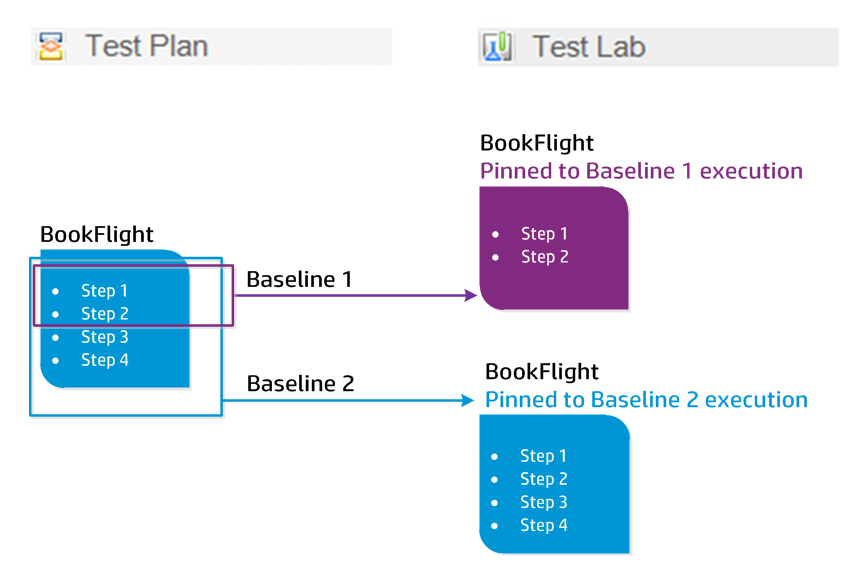
Jack, a test engineer, is designing tests to check the flight booking feature of the Mercury Tours website. In the Test Plan module, he creates the BookFlight test consisting of two steps (step 1 and step 2).
As part of the next stage, the development team begins adding more functionality to the flight booking feature. To test this new functionality, Jack must update the BookFlight test with two more steps (step 3 and step 4.) Before updating the test, Jack creates a baseline (Baseline 1). In Baseline 1, BookFlight consists only of steps 1 and 2. Jack then proceeds to update the test with the two additional steps. The test with 4 steps will be saved in Baseline 2.
At the same time Alice, a QA tester, is testing the earlier version of the website that does not include the new functionality, as the development team is still working on this. The test set that she has created in the Test Lab module includes the BookFlight test that Jack has been updating. If she runs the latest Bookflight test with steps 3 and 4 included, the test will fail. To make sure that she runs the correct version of the test, Alice pins Bookflight to Baseline 1 before running the test. This removes steps 3 and 4 from the test.