Share this page


Technology and Architecture
OpenText Application Quality Management is an enterprise-wide application that is based on Java 2 Enterprise Edition (J2EE) technology. J2EE technology provides a component-based approach to the design, development, assembly, and deployment of enterprise applications.
Understanding the Components
An OpenText Application Quality Management system contains the following components:
-
Client components. When you open Application Lifecycle Management or Site Administration on your client machine, client components are downloaded to the machine. Client components interact with each other using .NET and COM technologies. The client communicates with the server over HTTP/S.
-
Server/Application server. Client requests are dispatched by servlets to the deployed server. OpenText Application Quality Management comes with a built-in application server called the Application Server.
The deployed application contains Application Lifecycle Management, Site Administration, and associated files which are packaged into a Web Application Archive (WAR) file. Client requests from OpenText Application Quality Management are dispatched to the deployed application.
The Java Database Connectivity (JDBC) interface is used to communicate between the application server and database server(s).
The server can run on a Windows or Linux platform.
-
Database server(s). The database server stores three types of schemas:
-
Site Administration schema. Stores information related to the system, such as domains, users, and site parameters. A row exists in this schema for each project you create.
Irrespective of how you configure your system, there is always only one Site Administration schema.
-
Lab_Project. Stores lab information related to managing functional and performance testing on remote hosts, LoadRunner Enterprise server data, and licenses. There is always only one Lab_Project schema.
-
Project schemas. Stores project information, such as entity data and user data. A separate schema exists for every project you create.
By default, the project schemas are created on the same database server as the Site Administration schema. These default project schemas are useful for smaller setups. However, if you are working with a large number of projects or with a small number of huge projects, it may be advisable to define additional database servers solely for storing project schemas. You define additional servers in the Site Administration DB Servers tab.
The schemas can reside on an Oracle or on a Microsoft SQL server.
Note: To improve system performance, it is advisable that the application server and the database server be installed on separate machines and be connected over LAN.
-
-
Project repository. Stores all files to be used by all the projects in the system. For example, .xml files, templates, and attachments. By default the repository is located on the same machine as the application server, which is useful for smaller setups. For larger organizations however, or when working in a clustered environment, it is advisable to install the repository on a dedicated machine.
When working in a clustered environment, the repository must be accessible by all nodes.
-
Load balancer. When working with a load balancer, client requests are transmitted to the load balancer and distributed according to server availability within the cluster.
-
Tanuki wrapper. A Java service wrapper that allows OpenText Application Quality Management to be installed and controlled like a native Windows Service. It also includes advanced fault detection software to monitor OpenText Application Quality Management.

Example of Basic Configuration
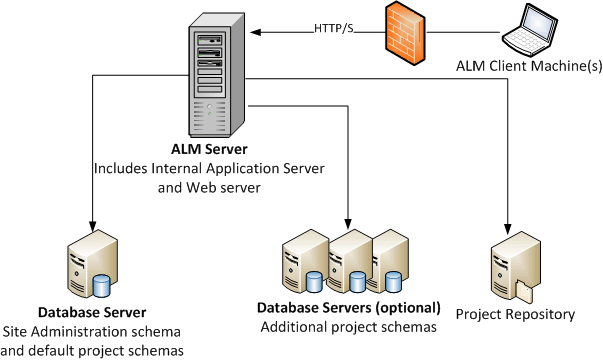
In the basic OpenText Application Quality Management configuration, the Jetty application server and the web server are embedded with the installation and installed on the same machine.
The following diagram illustrates a basic system configuration:
To enhance security in this configuration:
-
Enable SSL on the Jetty and make it required.
Alternatively, install an Apache or IIS web server acting as a reverse proxy in front of the server and configure SSL on the reverse proxy server. This protects the server and uses the IIS or Apache security related features to enhance security.
For information on enabling SSL for all interactions with IIS, see the IIS documentation. SSL must be enabled for the entire IIS web server under which you install the ALM applications.
For information on enabling SSL for all interactions with Apache, see the Apache documentation.
-
Use a firewall and close access to all incoming traffic except for the https/http port used by OpenText Application Quality Management.
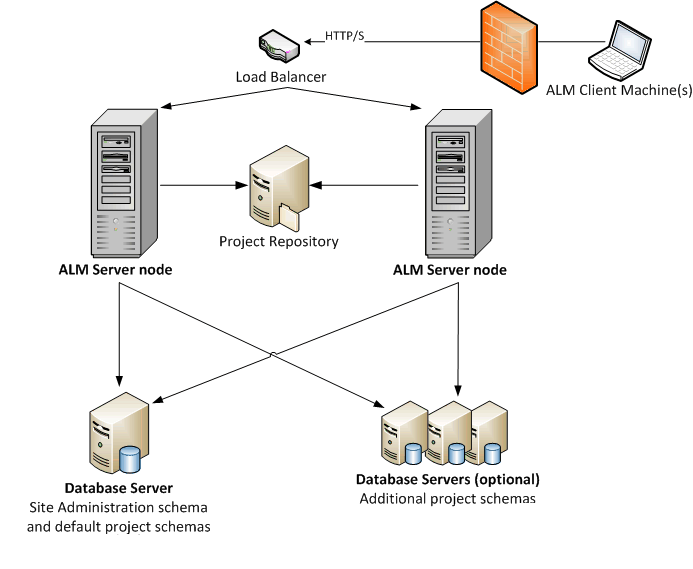
Example of Clustered Configuration
Within the J2EE framework, OpenText Application Quality Management supports clustering. A cluster is a group of application servers that run as if they were a single system. Each application server in a cluster is referred to as a node.
Clusters provide mission-critical services to ensure maximum scalability. The load balancing technique within the cluster is used to distribute client requests across multiple application servers, making it easy to scale to an infinite number of users.
Take the following into consideration when setting up a clustered environment:
-
All nodes must have access to the database server on which the Site Administration database schema resides.
-
All nodes must have access to all database servers.
-
All nodes must have access to the repository. By default the repository is located on the first node in the cluster, and therefore all other nodes must have access to the first node. If you install the repository on a dedicated machine, each node must have access to that machine.
-
The load balancer must be configured with the health monitor, using the following KeepAlive uniform resource identifier (URI):
Send String: GET /qcbin/servlet/tdservlet/
Receive String: up and running
- The load balancer must be configured with session persistency. Set the persistency to sticky session enabled or destination address affinity, depending on the load balancer.
To enhance security in this configuration:
-
Require SSL for the ALM virtual IP on the load balancer.
-
Use a firewall on each ALM server to block access to all incoming traffic except for the http port (8080) or https port (8443) used by OpenText Application Quality Management.
-
If you have external clients connecting to the deployment from outside the corporate firewall, place an Apache or IIS web server as a reverse proxy in front of the corporate firewall behind which the servers are deployed, and require SSL on the reverse proxy.
The following diagram illustrates a clustered system configuration: