
Share this page


Upgrade the MO_LIST table
Overview
The build_upgrade_molist utility program is used to:
-
Convert Dimensions MO_LIST rows so that the data items in this table reflect the latest definitions of the data items used in the product.
-
Prune unnecessary records from the MO_LIST structure.
You can run the utility repeatedly to perform pruning operations. However, it is useful when converting to a 14 database. Failure to run this conversion utility results in incorrect target determination during build processing and incorrect soft record processing.
Support can provide a process to help you check if the upgrade is required. Due to the existence of several paths to 14, some from earlier conversion processes, it is recommended to run this process.
The primary purpose of the utility is to manipulate the contents of the MO_LIST table, which contains build relationships. While the utility is executing the database is not altered and is available. The utility outputs a text file containing the proposed rows. You can then inspect the file and load it into the target system using the -load command or an Oracle utility. There are multiple qualifiers to control the behavior of the commands.
The MO_LIST table holds made-of relationships between items and items. It is used extensively in builds to determine what makes up an artifact. There are several sorts of records on this table. The records used by build have the flags 'O' and 'S':
-
O: Hard or ordinary relationship records that record actual dependencies observed by the build system.
-
S: Soft records that record putative relationships derived from hard relationships on an earlier version of a source item.
Note:
-
M flag records are placed on this table by
dm_make/mcxslaveprocessing but these are outside the scope of build. -
The utility has a backup facility, so you can use it with relatively low risk.
-
If you are not running Dimensions Build on MVS you do not need to run this utility.
-
You must run this utility before you perform any builds in Dimensions CM 14.
-
The upgrade utility may delete rows from the MO_LIST table. It is recommended that you back up this table or the whole database before running the utility. As an added safeguard, the utility automatically makes a backup of the data.
-
The utility can also be used, including after an upgrade, to reduce the size of the MO_LIST table.
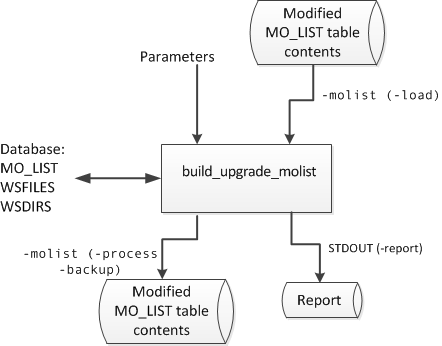
The following diagram illustrates the data input and output flow:
Unique Records
After the utility has completed an upgrade, each pair (from_uid, to_uid) is unique. This behavior optionally allows a new index to be
created against the MO_LIST table, which may be useful in very large
installations. For details, see Create new indexes for the table.
Soft relationships
A new set of soft records can be created by inspecting the existing relationships. The following should work as expected:
-
Impacted target functionality.
-
Build wizards.
-
Newly edited versions of source files that have never been built.
-
Older revisions which will never be built.
You can use this feature to create initial soft records when upgrading from an earlier version, or to replace the current set of records if they need to be reorganized.
Prune redundant relationships
If you have a very large number of rows on MO_LIST the utility purges the redundant rows. This only has a small impact on functionality. The build wizards should work as expected on all source items revisions, even after a rollback, or when using an old baseline.
The following are retained:
-
All item revisions of both sources and targets.
-
Relationships from all source revisions, with a minimum of one revision of each target present at every stage of each lifecycle.
The only relationships that are removed are duplicate links, from a given source to multiple versions of the same target. However, older versions of targets (not sources) may not have made-of relationships recorded. If this is a problem then a purge can be optional. Purge can be mitigated by using the footprinting feature of Dimensions Build to record the makeup of each target. A source based impacted targets search works from any version of that source.
Syntax
build_upgrade_molist
  [-f <parameter filename>]
  -direct dbname/dbpassword@conn | <server connection parameters>
  -process | -backup | -load | -report | -all
<qualifiers>
where qualifiers can be:
|
Qualifier |
-process |
-backup |
-load |
-report |
-all |
Description |
|
|---|---|---|---|---|---|---|---|
|
-trace |
y |
y |
y |
y |
y |
Turns on command tracing.
Option 2 is only available in conjunction with the -spec qualifier to limit the scope of the operation. |
|
|
-schema |
y |
y |
y |
y |
y |
Overrides a schema, for example: Applies to the MO_LIST table, WSFILES and WSDIRS. |
|
|
-molist |
y |
y |
y |
|
y |
Specifies a text file containing MO_LIST records. |
|
| -del | y |
Deletes or replaces table rows.
|
|||||
|
-overwrite |
|
y |
|
|
|
|
|
|
-product |
|
|
|
y |
|
Specifies a product. |
|
|
-project |
|
|
|
y |
|
Specifies a project. |
|
|
-filename |
|
|
|
y |
|
Specifies a mask to limit reporting. |
|
|
-spec |
y |
|
|
|
|
Limits processing to specific item spec uids. |
|
|
-drop |
y |
|
|
|
|
Drops relationships to target objects that match the specified mask. |
|
|
-s |
y |
|
|
|
|
Creates soft records.
|
|
|
-o |
y |
|
|
|
|
Controls hard record pruning.
|
For details, see Qualifier options.
Use a parameter file
Use the optional command -f <parameter filename> to read a file for additional parameters. This is particularly useful for options that are verbose such as -drop that can appear many times. It is easier to specify this list in a file, and refer to it with -f, than generate long commands. Do not use parameters containing spaces inside the parameter file. Example:
-f parm.txt
Log in to Dimensions CM
-directUse this option if you are local to the Dimensions Oracle instance to log in directly to the database without using Dimensions. Dimensions does not have to be running and users can use the tables when the utility is executing:
-direct \"dbname/dbpassword@conn\"
Example:
-direct intermediate/intermediate@dim14
<server connection parameters>Use this option to log in using a Dimensions server, which must be running.
-server localhost:671 -user dmsys -password dmsys -database intermediate -conn dim14 Example:
-server localhost:671 -user dmsys -password dmsys -database intermediate -conn dim14
-process command
This command performs an upgrade of the build relationship data without altering the tables. It is a read only process that creates a file containing the changed data. You can then load the file into the database using the -load command or use Oracle techniques.
-backup command
This command creates a text file of every row in the MO_LIST table.
Alternatively, you can use Oracle’s native backup features.
-load command
This command loads a text file of build relationships into the MO_LIST table. This is the only command that writes to a table. This file can be a backup taken earlier with the -backup command or an upgraded table produced by the -process command.
Tip: sqlldr in Oracle may be quicker for very large tables. For details, see Use sqlldr.
-report command
This command lists the relationships that are found against a set of source revisions. The filename does not include the path and is in Dimensions format. It is used in LIKE ".." expressions in SQL therefore is case sensitive and can use % and _ wildcards. For mainframe files, use FOO.COBOL rather than COBOL(FOO).
Qualifiers:
-
-product(case sensitive)
-
-project(case sensitive)
-
-filename(filename not the path)
Example:
-product PAYROLL
-project TEST1
-filename test.c
-all command
This command executes a sequence of commands with pre-defined filenames. You can use it to execute an upgrade with a single command. It is equivalent to the following sequence of commands:
-backup molist_backup.txt
-process molist_process.txt
-load molist_process.txt
Qualifier options
| Qualifier | Options |
|---|---|
| -trace |
0: No tracing 1: Normal tracing 2: Use with the -report qualifier for more detail. |
| -schema |
The
Usually the tables all come from the schema you connected to with the - direct or -database options. However, you can get MO_LIST from a different schema if required, using the -schema qualifier. For this to work you need to grant access to MO_LIST to the user which you logged in with. This is useful if you have restored a backup into BACKUP.MO_LIST and need a matching ws_files and item_catalog in another database. You then run the following commands: sqlplus backup/backup@dim14 For example: Grant select, insert, delete on table backup.mo_list to intermediate; You can load data into a foreign schema with the -schema qualifier. For example, this allows you to load the data into a test system. The table is called XXX.MO_LIST and the active user requires the GRANT INSERT permission. |
| -del | -del <sql delete option> where
The rows read from the file can either replace the rows already on the
table or be merged with them. This depends on the |
| -spec | -spec <obj_spec_uid> For testing and investigation it is useful to limit the utility to process only certain items. You can do this by listing the OBJ_SPEC_UID values, for example: -spec 8943226 -spec 9070313 -spec 9101070 List the source |
| -drop | -drop <sql like-clause> Use this qualifier to drop relationships to certain types of target objects.
Use it multiple times to get a list. The strings are used in -drop %.DBRM -drop foo.obj |
| -s |
Creates soft records where
|
| -o |
Prunes hard records where
Note: Even if you specify |
Reload the table
You can use the -load command to reload the table. However, for very large tables that exceed one million rows this might take a long time and put a strain on the Oracle re-do logs. It may be quicker to do the following:
-
Drop the MO_LIST table and all its indexes.
-
Recreate the empty MO_LIST table without indexes.
-
Use the sqlldr process from Oracle to reload data from the text file.
-
Recreate the indexes.
-
Grant again any accesses that are required.
-
Redo Oracle statistics.
You can perform step 2 by itself, but it is probably as fast as using the - load command.
An Oracle DBA can perform these steps by making note of how the table is currently set up so that it can be re-created in the same way (grants, indexes, and views). This process is quicker because the drop table is much faster than deleting all the rows (due to the re-do logs).
Create a text file called molist-sqlldr.txt similar to this:
load data
infile 'd:\molist_process.txt'
into table mo_list
fields terminated by "," optionally enclosed by '"'
( from_uid
, to_uid
, flag
, rule_uid
, build_uid
, from_fv
, to_fv
, from_workset_uid
, to_workset_uid
, from_virtual
, to_virtual
)
Note the infile syntax that names what the input file is. This is the file named by -molist in the upgrade command. For example:
sqlldr intermediate/intermediate@dim14
  control=molist- sqlldr.txt
Create new indexes for the table
This is an optional step and is only useful if you have a very large MO_LIST table with millions of rows. You can combine it with the sqlldr process or execute it after the table is up and running after using the -load command. After running the -process command with -o 1, 2, or 9, the data is unique with respect to (from_uid,to_uid). Certain operation in the server may be faster if unique indexes are created.
The following two indexes can be created:
CREATE unique INDEX nbp.mo_listu1 ON nbp.mo_list
(
   to_uid
   , from_uid
);
CREATE unique INDEX nbp.mo_listu2 ON nbp.mo_list
(
   from_uid
   , to_uid
)
Example of a full command:
CREATE unique INDEX nbp.mo_listu1 ON nbp.mo_list
(
       to_uid
       , from_uid
)
PARALLEL
(
       DEGREE 1
       INSTANCES 1
)
PCTFREE   10
INITRANS   2
MAXTRANS   255
STORAGE
(
       INITIAL            65536
       NEXT 1             048576
       MINEXTENTS         1
       MAXEXTENTS         unlimited
       FREELISTS          1
       FREELIST GROUPS    1
       BUFFER_POOL        DEFAULT
)
LOGGING
TABLESPACE pcms_data
;
CREATE unique INDEX nbp.mo_list2 ON nbp.mo_list
(
       from_uid
       ,to_uid
)
PARALLEL
(
       DEGREE                 1
       INSTANCES              1
)
PCTFREE  10
INITRANS  2
MAXTRANS  255
STORAGE
(
        INITIAL              65536
        NEXT                 1048576
        MINEXTENTS           1
        MAXEXTENTS           unlimited
        FREELISTS            1
        FREELIST GROUPS      1
        BUFFER_POOL          DEFAULT
)
LOGGING
TABLESPACE pcms_data
;
Upgrade example
This example shows how to upgrade MO_LIST using the build_MO_LIST_upgrade utility.
-
Back up the MO_LIST table:
build_upgrade_molist \
   -direct intermediate/intermediate@d1222t0 \
   -backup \
   -molist ./backup-molist.out
This command:
-
Copies all the data from the MO_LIST table to a backup file.
-
Does not make changes to the MO_LIST table.
-
Fails if
backup-molist.outalready exists. Use the qualifier-overwriteto overwrite it.
-
-
Read the MO_LIST structure and obtain a report:
build_upgrade_molist \
   -direct intermediate/intermediate@d1222t0 \
   -report \
   -product ACCTS \
   -workset ACCTS \
   -filename %
This command:
• Reports on the MO_LIST table contents.
• Does not change the MO_LIST table.
• Sends the output file to stdout.
Note:
-filenameselects everything. -
Read and process the MO_LIST structure:
build_upgrade_molist \
   -direct intermediate/intermediate@d1222t0 \
   -process \
   -molist ./trimmed-molist.out \
   -drop %.DBRM \
   -drop %.LNKLIB \
   -s 2 \
   -o 2
This command:
-
Drops all relationships from source to DBRMs.
-
Drops all relationships from LNKLIB outputs.
-
Uses file names to reduce the number of soft records.
-
Keeps two generations of source and target pairs.
-
Writes the changed MO_LIST data to trimmed-molist.out.
-
Always overwrites trimmed-molist.out.
-
Does not make changes to the database.
-



