Share this page


The Application Components graphs provide you with performance information for .NET classes and methods. To obtain data for these graphs, you must activate the .NET CLR performance monitor before running the load test scenario run.
Displayed measurements are specified using the .NET monitor. For details, see Monitor and graph types.
.NET Average Response Time graph
This graph specifies the average time that .NET classes or methods took to perform during the load test scenario run.
| Item | Description |
|---|---|
| X-axis |
Elapsed time from the beginning of the scenario run. |
| Y-axis |
Average response time of a .NET class or method. |
| Breakdown options |
The graph initially displays .NET classes, but you can also view the individual methods within a .NET class by using drill-down or filtering techniques. |
| Tips |
You can change the length of the sample interval. Hint: To highlight a specific class line in the graph, select the class row in the legend (displayed below the graph). |

.NET Breakdown graph
This graph summarizes fundamental result data about .NET classes or methods and presents it in table format.
| Item | Description |
|---|---|
| Purpose |
Using the .NET Breakdown table, you can identify the .NET classes or methods which consume the most time during the test. The table can be sorted by column, and the data can be viewed either by .NET class or .NET method. |
| Breakdown options |
The Average Response Time column shows how long, on average, a class or method took to perform. The next column, Call Count, specifies the number of times the class or method was invoked. The final column, Total Response Time, specifies how much time was spent overall on the class or method. It is calculated by multiplying the results from the first two columns together. Classes are listed in the .NET Class column in the form Class:Host. In the table above, the AtmMachineSample.AtmTeller class took an average of 783 seconds to execute and was called 50,912 times. Overall, this class took 39,316 seconds to execute. To sort the list by a column, click the column heading. Each column in the .NET Breakdown graph is graphically represented by another graph. The table initially displays .NET classes, but you can also view the list of .NET methods. To view .NET methods, select the .NET Methods option, or double-click the class row. The methods of the specified class are listed in the .NET Method column. |
| .NET Breakdown Column | Graphical Representation |
|---|---|
|
Average Response Time |
.NET Average Response Time Graph. |
|
Call Count |
.NET Call Count Graph. |
|
Total Response Time |
.NET Total Operation Time Distribution Graph. |
.NET Call Count Distribution graph
This graph shows the percentage of calls made to each .NET class compared to all .NET classes. It can also show the percentage of calls made to a specific .NET method compared to other methods within the class
| Item | Description |
|---|---|
| Breakdown options |
The number of calls made to the class or method is listed in the Call Count column of the .NET Breakdown graph table. The graph initially displays .NET classes, but you can also view the individual methods within a .NET class by using drill-down or filtering techniques. |
| Tips |
To highlight a specific class line in the graph, select the class row in the legend (displayed below the graph). |
.NET Call Count graph
This graph displays the number of times that .NET classes and methods are invoked during the test.
| Item | Description |
|---|---|
| X-axis |
Elapsed time from the beginning of the scenario run. |
| Y-axis |
Indicates how many calls were made to a .NET class or method. |
| Breakdown options |
The graph initially displays .NET classes, but you can also view the individual methods within a .NET class by using drill-down or filtering techniques. |
| Tips |
To highlight a specific class line in the graph, select the class row in the legend (displayed below the graph). |
| Note |
The call count is computed by multiplying the call frequency by a time interval. As a result, the reported measurement may be rounded. |
.NET Call Count per Second graph
The graph shows the number of times per second that a .NET class or method is invoked.
The Breakdown options graph is similar to the .NET Call Count graph except that the y-axis indicates how many invocations were made to a .NET class or method per second.
The graph initially displays .NET classes, but you can also view the individual methods within a .NET class by using drill-down or filtering techniques.
Tip: To highlight a specific class line in the graph, select the class row in the legend (displayed below the graph).
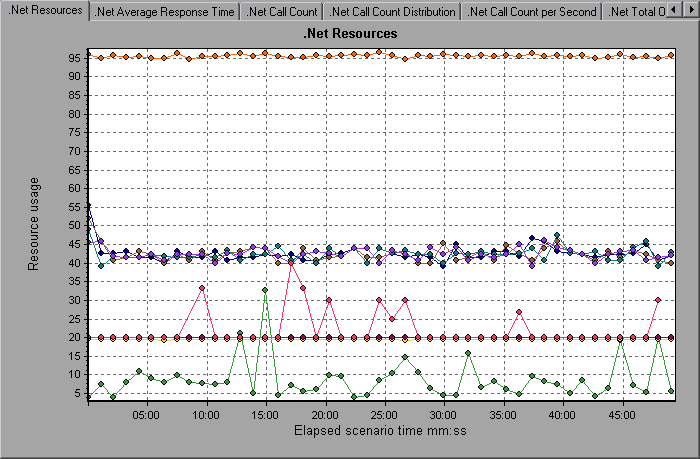
.NET Resources graph
This graph shows the resource usage of .NET methods as a function of the elapsed load test scenario time.
Each .NET method is represented by a different colored line on the graph. The legend frame (located below the graph) identifies the methods by color:

You can monitor .NET counters at the application, assembly, class, and method levels. Measurements that take place before the application is fully loaded (such as Assembly Load Time, that measures the time it takes to load an assembly) are not measured.
The following tables describe the counters that can be measured at each level. All durations are reported in seconds, and all frequencies are reported per five-second polling periods. For example, if 20 events occur in a 5 second polling period, the reported frequency is 4.
| Measurement | Description |
|---|---|
|
Application Lifetime |
Monitors the duration of the application in seconds. |
|
Exception Frequency |
Monitors the number of exceptions per second, in the five second polling period. |
|
JIT (Just In Time) Duration |
Monitors the time (in seconds) it takes for the JIT to compile code. |
|
Thread Creation Frequency |
Monitors the number of threads that are created in a polling period. |
|
Thread Lifetime |
Monitors the duration of threads. |
|
Domain Creation Frequency |
Monitors the number of domain creations in a polling period. (Domains protect areas of code. All applications run in a domain which keeps them encapsulated, so that they cannot interfere with other applications outside the domain.) |
|
Domain Load Time |
Monitors the time it takes to load a domain. (Domains protect areas of code. All applications run in a domain which keeps them encapsulated, so that they cannot interfere with other applications outside the domain). |
|
Domain Unload Time |
Monitors the time it takes to unload a domain. (Domains protect areas of code. All applications run in a domain which keeps them encapsulated, so that they cannot interfere with other applications outside the domain). |
|
Domain Lifetime |
Monitors the duration of a domain. (Domains protect areas of code. All applications run in a domain which keeps them encapsulated, so that they cannot interfere with other applications outside the domain). |
|
Module Creation Frequency |
Monitors the number of modules that get created in a polling period. (Modules are groups of assemblies that make up a DLL or EXE). |
|
Module Load Time |
Monitors the time it takes to load a module. (Modules are groups of assemblies that make up a dll or exe). |
|
Module Unload Time |
Monitors the time it takes to unload a module. (Modules are groups of assemblies that make up a dll or exe). |
|
Module Lifetime |
Monitors the duration of a module. (Modules are groups of assemblies that make up a dll or exe). |
|
Garbage Collection Duration |
Monitors the duration between the start and stop of Garbage Collection. |
|
Garbage Collection Frequency |
Monitors the number of breaks for Garbage Collections in a polling period. |
|
Unmanaged Code Duration |
Monitors the duration of the calls to unmanaged code. |
|
Unmanaged Code Frequency |
Monitors the number of calls to unengaged code in a polling period. |
| Measurement | Description |
|---|---|
|
Assembly Creation Frequency |
Monitors the number of assembly creations in a polling period. (Assemblies hold the .NET byte code and metadata). |
|
Assembly Load Time |
Monitors the time it takes to load an assembly. (Assemblies hold the .NET byte code and metadata). |
|
Assembly Unload Time |
Monitors the time it takes to unload an assembly. (Assemblies hold the .NET byte code and metadata). |
|
Assembly Lifetime |
Monitors the duration of an assembly. (Assemblies hold the .NET byte code and metadata). |
| Measurement | Description |
|---|---|
|
Class Lifetime |
Monitors the duration of a class. |
|
Class Load Time |
Monitors the time it takes to load a class. |
|
Class Unload Time |
Monitors the time it takes to unload a class. |
At the method level, the measured time is per method, exclusive of other methods, calls to unmanaged code, and garbage collection time.
| Measurement | Description |
|---|---|
|
Method Duration |
Monitors the duration of a method. |
|
Method Frequency |
Monitors the number of methods called in a polling period. |
.NET Total Operation Time Distribution graph
This graph shows the percentage of time that a specific .NET class took to execute in relation to all the .NET classes. It can also show the percentage of time that a .NET method took to execute in relation to all the .NET methods within the class.
| Item | Description |
|---|---|
| Purpose |
Use this graph to identify those classes or methods that take an excessive amount of time. |
| Breakdown options |
The graph initially displays .NET classes, but you can also view the individual methods within a .NET class by using drill-down or filtering techniques. |
| Tips |
To highlight a specific class line in the graph, select the class row in the legend (displayed below the graph). |
.NET Total Operation Time graph
This graph displays the amount of time that each .NET class or method took to execute during the test. You can use this graph to identify those classes or methods that take an excessive amount of time.
Breakdown options:
The graph initially displays .NET classes, but you can also view the individual methods within a .NET class by using drill-down or filtering techniques.
To highlight a specific class line in the graph, select the class row in the legend (displayed below the graph).
| Axis | Description |
|---|---|
| X-axis |
Elapsed time from the beginning of the scenario run. |
| Y-axis |
Total time a .NET class or method is in operation. |
 See also: