Share this page


Project repository
This section describes the project repository and how to view the repository root path.
Note: The File Repository tab is not available to Tenant Admin users. For details, see Predefined admin roles.
Project repository overview
The project repository stores all files to be used by all the projects in the system. For example, scripts, run results, .xml files, templates, and attachments.
When you install OpenText Enterprise Performance Engineering, the installation program creates an empty project repository on the server file system, according to the repository root path you entered in the Configuration wizard.
By default, the project repository is located under the root directory. The folder is named by the project's unique ID (GUID), and supports only local path drives (C:\) and UNC paths (such as \\system\Remote Repo). The repository is supported with Azure Files Share using a UNC path. For details, see Understanding the project structure.
Migrating the repository
After installing, you can migrate the repository from existing projects so files are gradually moved to the new location.
Depending on different factors such as repository size and network speed, file migration may take considerable time.
Track the file migration status for each project and troubleshoot any problems that occur.
Deleting entities from a project
When you delete an entity with related folders or files in the project repository, the cleanup job deletes those files after 7 days.
Understanding the project structure
The root folder contains a sub-folder for each project; the name of the folder is the unique ID of the project (GUID).
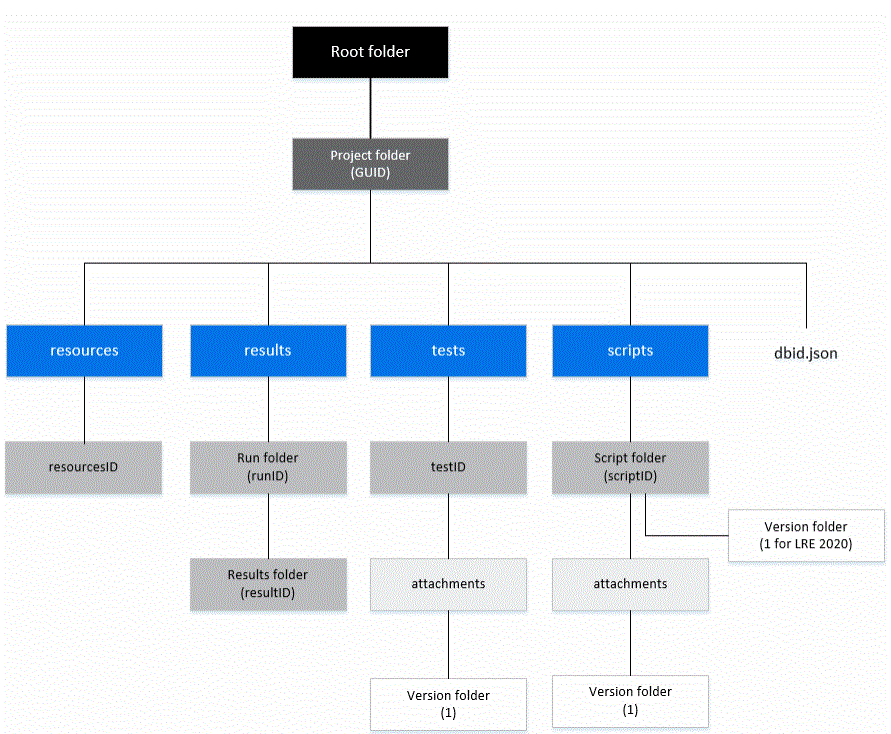
When a new project is created or migrated, each of the following sub-folders and files is created in the project folder:
-
resources. Contains the analysis template files.
-
results. Contains results for each performance test run.
-
tests. Contains a folder denoted by the test ID, and a sub-folder with attachments (if any) for the test.
-
scripts. Contains a folder for each script, and a sub-folder with attachments (if any) for the script.
-
dbid.json. An initialization file that stores project information required for restoring a connection to a project. This file is only generated after you remove the project; it is not part of the project structure. For details, see Restore access to a project.
View the project repository root path
To view the repository root path, in the Administration module, select Configuration > Site Configuration, and click File Repository. The repository root path and description (if any) are displayed.
View repository usage for all projects in the system
The file repository usage reports enable you to keep track of file usage and see how much storage space is used for each project in the system.
Tip: To view details of file storage usage at the project level, see View project repository usage.
-
In the Administration module, select Configuration > Site Configuration, and click File Repository.
-
The file repository usage reports are displayed.
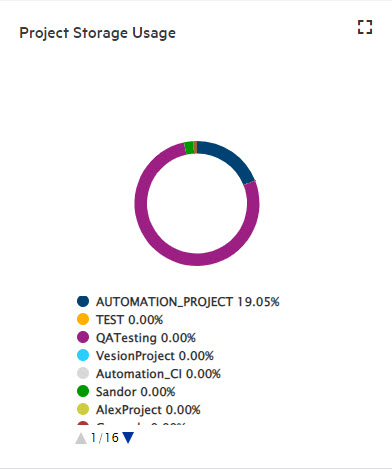
Report Description File Storage Usage The pie chart shows the percentage of the total file repository that each project uses.
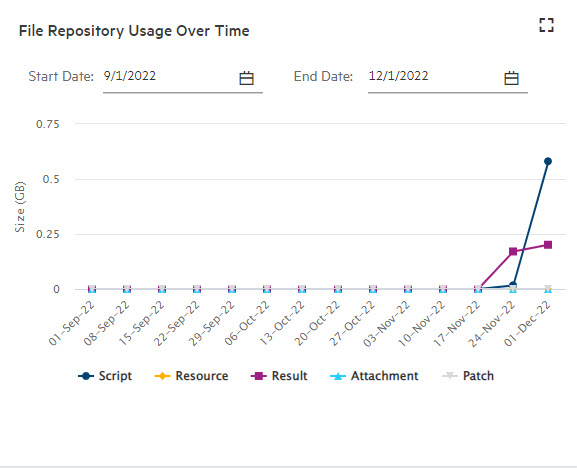
File Repository Usage Over Time The graph shows the file repository usage (scripts, attachments, results, and resources) over time for all projects in the system. You can filter the graph by selecting a start and end date.
Notes and limitations
-
Do not modify the project file system because this could adversely affect your projects.
-
Windows password protected sharing settings might influence the usage of the repository. When password protected sharing is turned on for the repository machine, there is no log record of failure to access the repository.