Share this page


Secure Topology
The PPM platform is designed to be part of a secure architecture, and can meet the challenge of dealing with the security threats to which it could potentially be exposed.
Several measures are recommended to securely deploy PPM servers:
-
Reverse proxy architecture
One of the more secure recommended solutions is to deploy PPM using a reverse proxy. PPM fully supports reverse proxy architecture as well as secure reverse proxy architecture. See Administer Project and Portfolio Management for information on configuring an external Web server as reverse proxy for PPM.
-
SSL communication protocol
The SSL protocol secures the connection between the client and the server. URLs that require a secure connection start with HTTPS instead of HTTP.
-
DMZ architecture using a firewall
The secure architecture referred to in this document is a typical DMZ architecture using a device as a firewall. The basic concept is to create a complete separation, and to avoid direct access, between the PPM clients and the PPM servers. This is especially important when opening access to PPM to external clients from outside of your organization.
-
Server Cluster Hardware Load Balancer Configuration
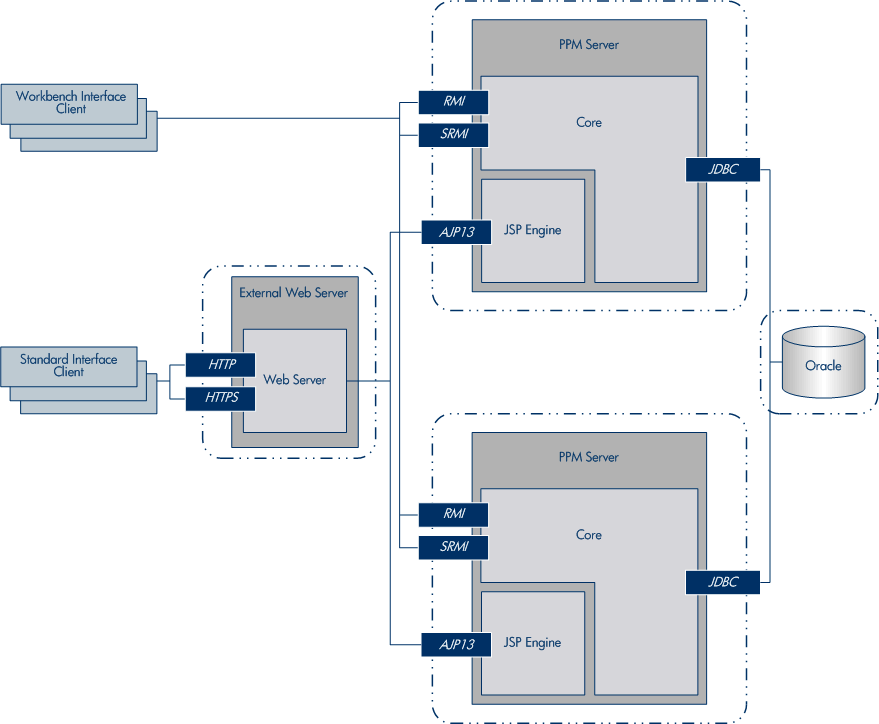
-
Distributed Denial of Service attack protection
Consider implementing DDoS attack protection on servers hosting PPM Web client only in cases where your PPM Web client is exposed to the public Internet. In most production environments, deploying PPM Web client on the public Internet are rare so carefully consider if this best practice applies to your specific deployment.
A few DDoS attacks such as Slowloris may be mitigated by implementing third-party protections such as the following:
-
mod_reqtimeout – applicable if using Apache HTTP server
-
mod_qos – applicable if using Apache HTTP server
-
F5 Big IP LTM iRule – applicable if using F5 hardware load balancer in front of the PPM Web client
Note: Due to the nature of these types of attacks, it is not possible to implement application-specific fixes or enhancements to prevent these types of attacks.
For more information, refer to the following:
-
Denial-of-service (DoS) attack reference documentation.
-
Apache HTTP Server documentation for request timeout configuration.
-
Apache issue tracking information for request-timeout behavior.
-
F5 documentation for mitigating DDoS attacks.
-
-
Denial-of-service (DoS) attack protection
Consider implementing DoS attack protection in on-premises deployments. You can use Apache Tomcat RateLimitFilter to mitigate DoS attack.
Note: In SaaS deployments, AWS WAF is a better choice.
To mitigate DoS attack, set the following parameters in the Admin Console or the server.conf file to limit request to web server:
Parameter Description DOS_ENFORCE
Set true to enable rate limiter DoS filter DOS_BUCKET_DURATION_IN_SECONDS
Duration in seconds DOS_BUCKET_REQUESTS Number of requests per duration DOS_STATUS_CODE Status code to return when the number of requests per duration exceeds the maximum number allowed DOS_STATUS_MESSAGE Status message to return when the number of requests per duration exceeds the maximum number allowed -
Host header positing attack protection
Set the HOST_HEADER_PROTECTION_ENABLED parameter to true to mitigate host header positing attack. When this parameter is set to true, only requests with host header in the trusted URLs (must be the same domain specified in either the TRUESTED_URL or BASE_URL parameter) are allowed.
Optionally, use the HOST_HEADER_PROTECTION_MESSAGE parameter to configure the message returned when the request is rejected due to host header protection.
-
Enforce HTTPS
When your base URL starts with HTTPS, you can set the ENABLE_SECURITY_RESPONSE_HEADERS parameter to true to apply HTTP Strict-Transport-Security (HSTS). The HSTS response header informs browsers to access the site only using HTTPS and convert any future HTTP attempts to HTTPS.
This approach is more secure than configuring a simple HTTP-to-HTTPS (301) redirect on your server, as the initial HTTP connection in a redirect can be vulnerable to man-in-the-middle attacks.