Share this page


Kafka agent settings
Available in versions: 26.3 and later
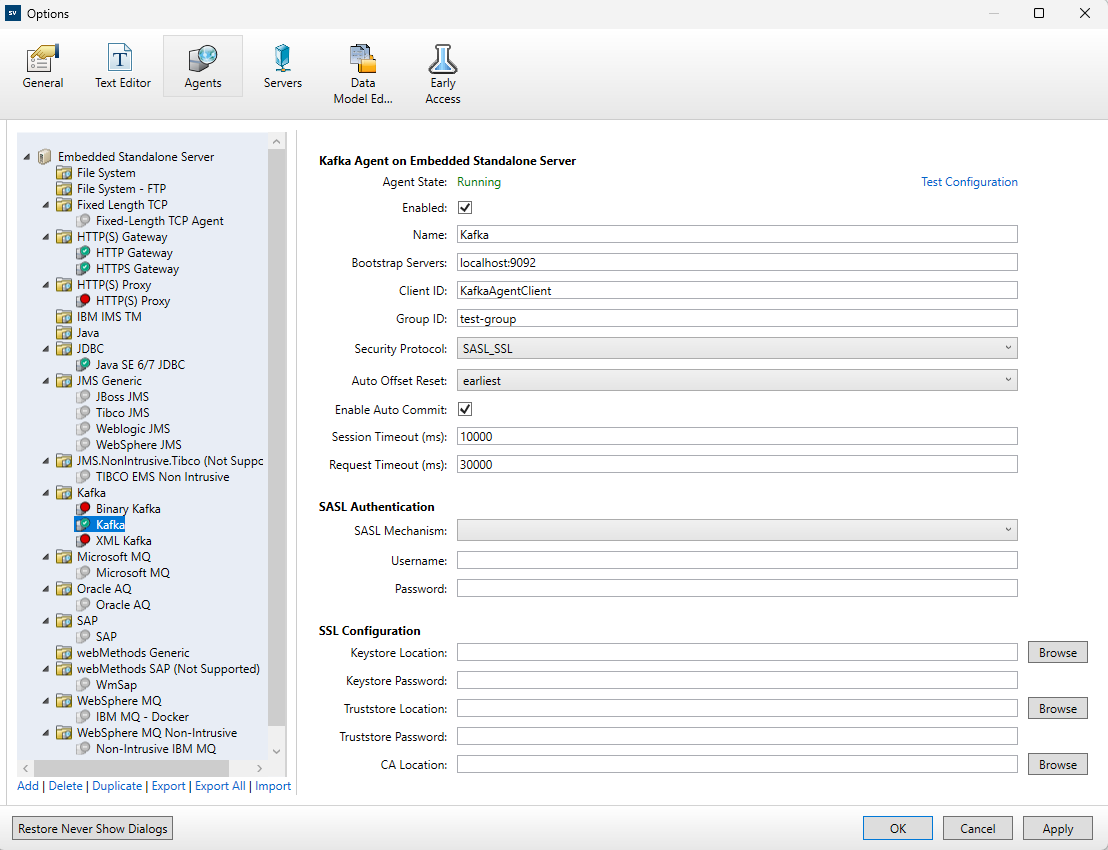
This dialog box enables you to configure the OpenText Service Virtualization Kafka agent. The agent handles communication between Kafka clients and real or virtual Kafka services.
Note: Kafka support is delivered at Beta level.
| To access |
|
| Important information |
For additional configuration guidance, see Configure the Kafka agent. |
| Relevant tasks | |
| See also | Agents |
User interface elements are described below (unlabeled elements are shown in angle brackets):
| UI Element | Description |
|---|---|
| <left pane> |
Displays the server configured for your project. Expand the server to display the available agents and configurations. |
| Add | Defines an additional Kafka agent configuration. |
| Delete | Deletes the selected configuration. |
| Duplicate | Creates another configuration by copying the selected one. |
| Import | Imports exported agent configuration files (.agce). |
| Export / Export All | Exports the selected configuration, or all configurations, to .agce format. |
| Test Configuration | Validates connectivity and security settings for the selected Kafka configuration. |
| Is Enabled | Turns the selected Kafka configuration on or off. |
| Name | Name of the selected agent configuration. |
| Bootstrap Servers | Comma-separated broker endpoints in host:port format used to bootstrap cluster metadata. |
| Security Protocol | Selects the transport and authentication mode: PLAINTEXT, SSL, SASL_PLAINTEXT, or SASL_SSL. |
| SASL Mechanism | Authentication mechanism for SASL modes. Supported values include PLAIN, SCRAM-SHA-256, and SCRAM-SHA-512. |
| SASL Username | Username used for SASL authentication. |
| SASL Password | Password used for SASL authentication. |
| SSL CA Location | Path to a PEM file or bundle containing trusted CA certificates for broker certificate validation. |
| SSL Truststore Location | Path to a PKCS12/PFX truststore containing trusted CA or intermediate certificates. |
| SSL Truststore Password | Password for the truststore file, if protected. |
| SSL Keystore Location | Path to a PKCS12/PFX keystore containing client certificate and private key for optional mutual TLS. |
| SSL Keystore Password | Password for the keystore file, if protected. |
| Group ID | Consumer group identifier used by the Kafka consumer in this configuration. |
| Auto Offset Reset | Defines where consumption starts when no committed offset exists (for example, earliest or latest). |