Share this page


TCP port overview
This section describes the communication paths and the ports that are used.
TCP port overview
SV uses several TCP ports for communication. To configure SV to work correctly in a protected network environment, you must verify that all required network ports are open.
For details on support port configurations, see Windows firewall and TCP port configuration.

Virtual Service Endpoint
In order to record and simulate the communication between a client application and a real service endpoint, you must place SV between them. In this scenario, communication from the client application to the virtual service, and from the virtual service to the real service is as follows:
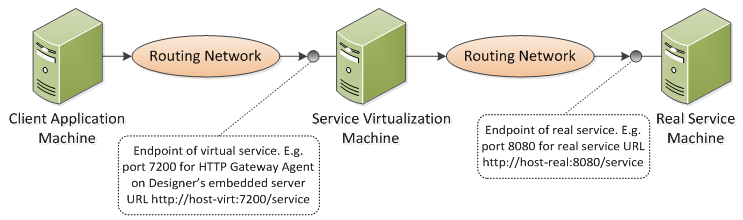
In this figure, the client application is reconfigured to communicate with the virtual service instead of the real service. The virtual service can be deployed on one of the following:
-
The SV Designer's embedded server
-
The SV Server
The port that SV uses depends on the agent that the virtual service is using. ( Agents handle communication between a client and a real or virtual service.)
SV agents use the following default ports for HTTP/HTTPS communication:
| Agent | Protocol Type | OpenText Service Virtualization Designer | OpenText Service Virtualization Server |
|---|---|---|---|
| Gateway | HTTP | 7200 | 6070 |
| HTTPS | 7205 | 6075 | |
| Proxy | HTTP | 7201 | 6071 |
| HTTPS | 7206* | 6076* | |
| JDBC | HTTP | 7288 | 6088 |
* The HTTPS Proxy Agent accesses this port directly using TCP.
The virtual service communicates with the real service's original endpoint. This is the same endpoint that the client application used before the client was reconfigured to communicate with the virtual service endpoint.
SV Management Endpoint
The management endpoint is the SV REST interface for remote communication. It is used for:
-
the Designer to connect to the SV Server
-
Service Virtualization Management to connect to Server
-
OpenText integration testing tools to connect to Server or Designer
-
SVConfigurator command line tool to connect to Server or Designer
-
OpenText Service Virtualization ResourceManager migration tool to connect to Server or Designer
The SV Designer communicates with the SV Server using the SV management endpoint. This communication is required when deploying virtual services on the SV Server. Communication between the SV Designer and the remote SV Server using the management endpoint is as follows:
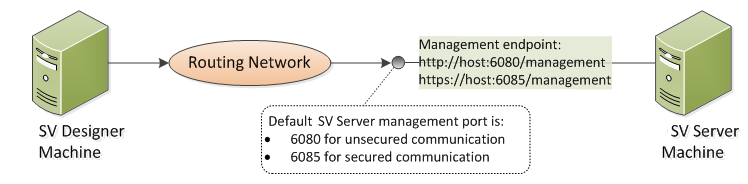
The SV Designer also provides a management port, used mainly for connecting to integration testing tools.
The SV management endpoint uses the following default port values:
| Management API | Protocol Type | OpenText Service Virtualization Designer* | OpenText Service Virtualization Server |
|---|---|---|---|
| Not Secured | HTTP | 7280 | 6080 |
| Secured | HTTPS | 7280 | 6085 |
* An alternative port number may be used if this port is not available when the Designer starts. The currently used port is displayed in the properties of the embedded server in the Designer, or in the log file.
Database Endpoint
Both the SV Designer and the SV Server require a database for data storage. The communication scenario between SV and the database is as follows:
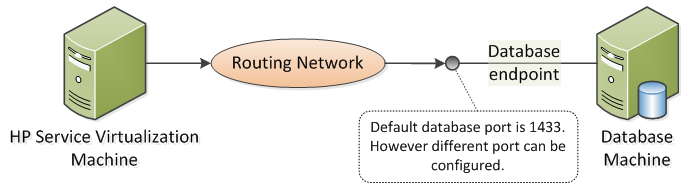
The default port of the database endpoint is 1433. However, the database administrator can reconfigure the database to use a different port.
SV Management Interface Endpoint
The SV Management interface enables you to view and manage all services from SV configured servers, without opening the Designer or individual projects.
The Management interface endpoint communicates with the SV Server on which it is configured using the server's Management API endpoint (ports 6085 or 6080).
The default port of the SV Management interface endpoint is 6086.
For details, see Get Started with SV Management.