
Share this page


Relevant for: GUI tests and components
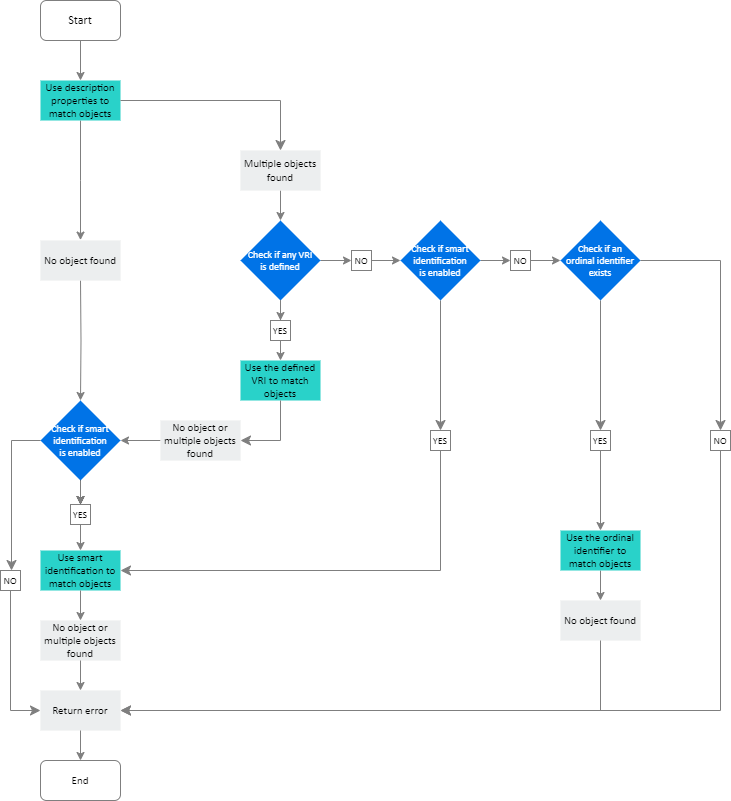
The flowchart below describes the process that tests use to identify objects in your application. If a unique object is identified, the flow ends successfully, and returns the found object.
Tip: For a detailed description of each identification mechanism, see Configure object identification, Visual relation identifiers (VRI), Smart identification, and Ordinal identifiers.
Notes for Web-based objects
-
If you defined Web object identifiers (such as XPath/CSS properties) for these test objects, they are used before the description properties. If one or more objects are found, object identification continues, according to the description properties. For details, see the section on Web Object Identifiers.
-
Additional automatically generated properties, such as source index or automatic XPath, may also affect the object identification process. You enable these properties in the Advanced Web Options tab of the Options dialog box (Tools > Options > GUI Testing tab > Web > Advanced node).



