
Share this page


Network and communication security
This section provides information on network and communication security.
Secure Topology
The ALM platform is designed to be part of a secure architecture, and can meet the challenge of dealing with the security threats to which it could potentially be exposed.
Several measures are recommended to securely deploy ALM servers:
-
Reverse proxy architecture
One of the more secure recommended solutions is to deploy ALM using a reverse proxy. OpenText Application Quality Management fully supports reverse proxy architecture as well as secure reverse proxy architecture. See the Install section of this help center for details on configuring a reverse proxy for OpenText Application Quality Management.
-
TLS/SSL communication protocol
Transport Layer Security (TLS) and its predecessor, Secure Sockets Layer (SSL), are cryptographic protocols designed to provide communication security over the Internet. URLs that require a secure connection start with HTTPS instead of HTTP. OpenText Application Quality Management supports TLSv1.2. For details on excluding weak protocols and ciphers, see this KB article.
-
DMZ architecture using a firewall
The secure architecture referred to in this document is a typical DMZ architecture using a device as a firewall. The basic concept is to create a complete separation, and to avoid direct access, between the OpenText Application Quality Management clients and the OpenText Application Quality Management servers. This is especially important when opening access to OpenText Application Quality Management to external clients from outside of your organization.
-
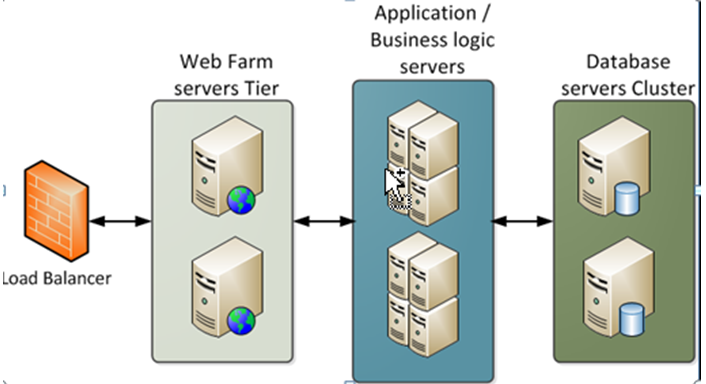
Separation between web servers, application servers, load balancers, and database servers.

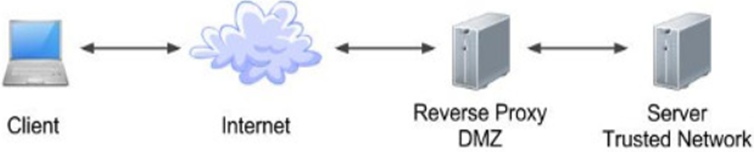
Reverse proxy overview
A reverse proxy is an intermediate server that is positioned between the client machine and the web servers. To the client machine, the reverse proxy seems like a standard web server that serves the client machine’s HTTP or HTTPS protocol requests, with no dedicated client configuration required.
The client machine sends ordinary requests for web content, using the name of the reverse proxy instead of the name of a web server. The reverse proxy then sends the request to one of the web servers. Although the response is sent back to the client machine by the web server through the reverse proxy, it appears to the client machine as if it is being sent by the reverse proxy.
Reverse proxy security
A reverse proxy functions as a bastion host. It is configured as the only machine to be addressed directly by external clients, and thus obscures the rest of the internal network. Use of a reverse proxy enables the application server to be placed on a separate machine in the internal network, which is a significant security objective.
DMZ is a network architecture in which an additional network is implemented, enabling you to isolate the internal network from the external one. Although there are a few common implementations of DMZs, this chapter discusses the use of a DMZ and reverse proxy in a back-to-back topology environment.
The following are the main security advantages of using a reverse proxy in such an environment:
- No DMZ protocol translation occurs. The incoming protocol and outgoing protocol are identical (only a header change occurs).
- Only HTTP or HTTPS access to the reverse proxy is allowed, which means that stateful packet inspection firewalls can better protect the communication.
- A static, restricted set of redirect requests can be defined on the reverse proxy.
- Most of the web server security features are available on the reverse proxy (authentication methods, encryption, and more).
- The reverse proxy screens the IP addresses of the real servers as well as the architecture of the internal network.
- The only accessible client of the web server is the reverse proxy.
- This configuration supports NAT firewalls.
- The reverse proxy requires a minimal number of open ports in the firewall.
- The reverse proxy provides good performance compared to other bastion solutions.
-
Using a secure reverse proxy architecture is easier to maintain. You can add patches to your reverse proxy as needed.
Note:
- The ALM application server installation does not include SSL. It is expected and recommended that the front end server (load balancer or reverse proxy) will be configured to require SSL.
-
Follow security guidelines for LDAP servers and Oracle or SQL databases.
-
Run SNMP and SMTP servers with low permissions.
Communication channels security
ALM supports the following secure channels:
| Secure Channel | How to Configure |
|---|---|
| Between client (including testing tools) and ALM server |
|
| Between ALM and database server | For details, see Configuring secure database access. |
| Between ALM and LDAP server | For details, see Enabling LDAP over SSL (LDAPS). |
| Between ALM and mail server | Specify a secure port when defining the mail server. |
| Between reverse proxy / load balancer and ALM server | Configure the ALM server with SSL (for details, see Manage the application server). On the reverse proxy or load balancer, use a secure connection to the ALM server (for example, https://<almserver>:8443/qcbin). For details on configuring load balancer, see Example of Clustered ALM Configuration in Technology and Architecture. |
| Between ALM and Global Search |
The firewall must be configured to accept incoming TCP traffic to the Global Search port (default 18080) from the ALM server only and not from any other source. |
Distributed denial of service attack protection
Consider implementing DDoS attack protection on servers hosting your ALM server, only in cases where your ALM server is exposed to the public internet. In most production environments, deploying ALM on the public internet are rare, so carefully consider if this best practice applies to your specific deployment.
A few DDoS attacks such as Slowloris may be mitigated by implementing third-party protections such as the following:
- mod_reqtimeout – applicable if using Apache HTTP server
- mod_qos – applicable if using Apache HTTP server
- F5BigIPLTM iRule – applicable if using F5 hardware load balancer in front of the ALM server
Note: Due to the nature of these attacks, it is not possible to implement application-specific fixes or enhancements to prevent these types of attacks.
FAQ
Question
Are exceptions required to be added to the firewall policy?
Answer
Placing a reverse proxy in front of the ALM server is recommended. The list of ports to be open in the firewall for the incoming traffic is documented in the Install section of this help center and in the OpenText Enterprise Performance Engineering help. The only port that must be opened on the ALM server for incoming traffic is the jetty port (8080, or 8443 if you are using a secure connection).
Question
How do I configure the ALM server in SSL using the certificate authority?
Answer
For details, see this KB article.
Question
How do I protect the data transition between the ALM client and server?
Answer
Only passwords undergo a special handling during the transition between client and servers. However, ALM passwords are only obfuscated before being transferred to avoid occasional sniffing. To secure password transfer (and data transfer in general) use a secure communication between the client machines and servers.



