Migrate projects to SaaS

Learn how to migrate your OpenText Enterprise Performance Engineering or ALM/PC (Performance Center) project from on‑premises to SaaS. This is relevant only if you plan to run performance tests in a SaaS environment.

Migration plan overview

The following table provides an overview of an OpenText SaaS migration plan. Tasks specific to the migration are based on customer readiness. The final project plan should be agreed to between OpenText SaaS and the customer following project kickoff.

Phase Customer OpenText Action Items

Set up new OpenText Enterprise Performance Engineering

(1-2 weeks)

  • Provide environment information and database

  • Inventory information on number of projects, size, and integrations

  • Determine sample projects for dry run

  • Create, validate, and deploy MSI bundle

  • Kick off

  • Review SOW

  • Provision new environment

  • Provide guidance on data extract and format

  • Provide query for reports

  • Provide ftp account

  • Project Plan

Upload data

(1-2 weeks)

  • Extract and zip data

  • Upload and ship drive

  • ‘Iterative step’

  • Set up remote network drive

  • Create, validate, and deploy MSI bundle

  • Download, extract, and copy data

  • Validate data format

Upgrade sample projects

(1-3 weeks)

 
  • Restore and upgrade sample projects

  • Smart repository optimizations

  • Convert from other databases to Oracle

  • Sanity checks and release

Dry-Run validation

(3-8 weeks)

  • Validate migrated and upgraded projects

  • Perform out-of-the-box break fix, guidance, and document

  • Verify project

  • Start and finalize plans for migrations batches and dates

  • Critical step to ensure successful and uneventful migration

  • Provide support

  • Out-of-the-box break fix

  • Start and finalize plans for migration batches and dates

Upgrade product

(2-4 weeks)

  • Ensure no checked out entities before extract

  • Extract data (plan accordingly)

  • Zip up and upload

  • Perform post migration validation and fixes

  • Link and push template

  • Sign off

  • Weekday migrations

  • Iterative pending on number of batches

  • Perform technical batch migrations and upgrade

  • Perform necessary fixes

  • Post upgrade support

  • Weekday migration

  • Iterative pending on number of batches

Back to top

Environment diagram

This diagram illustrates the SaaS environment and interaction between the OpenText Enterprise Performance Engineering and customer AUT environments.
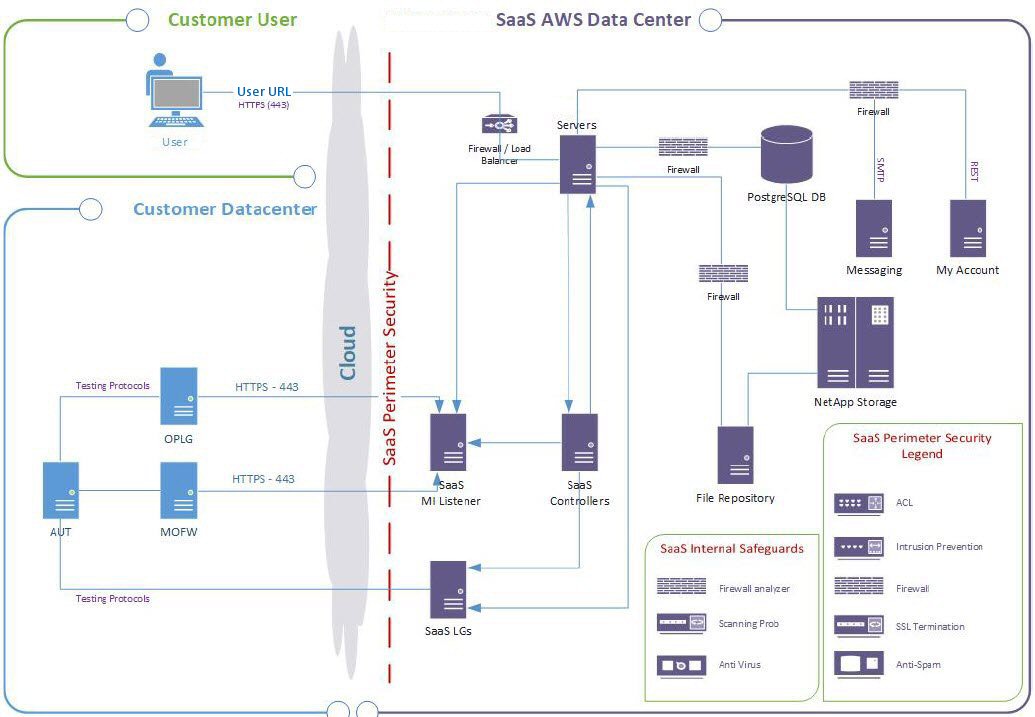
SaaS  environment diagram

Back to top

Migration tasks

For details about migrating OpenText Enterprise Performance Engineering or ALM/PC from on-premises to SaaS, see the following instructions:

Back to top