What's new in 25.1-25.3

This topic introduces the new features and improvements in OpenText Enterprise Performance Engineering (LoadRunner Enterprise) CE 25.1 and 25.3.

What's New videos

Learn about some of the new features included in this version:
What's Mew video

What's New in 25.3

What's Mew video

What's New in 25.1

Back to top

Whats new in version 25.3

Version 25.3 contains the following new features and enhancements.

Area Enhancement
Performance Engineering Aviator (Beta)
  • Aviator for Scripting in VuGen provides assistance with many aspects of the scripting process. Using AI assistance before, during, and after the scripting process can help to save time and simplify script creation.

    Aviator can assist with tasks such as selecting the best protocol for an application scripting session, error analysis and remediation, function and coding assistance, script optimization, and script summarizing. When combined, these assisted actions can yield significant time savings, while also reducing required scripting skill sets.

    All users, from new to experienced performance engineers, will welcome Aviator's partnership in the scripting process.

  • Aviator for Analysis in OpenText Core Performance Engineering Analysis redefines how teams approach performance analysis. It helps accelerate investigations, increase productivity, and streamlines the onboarding of new team members.

    Through conversational analysis, performance engineers can interact with Aviator using natural language directly within the dashboard environment. When you ask for summaries, trends, anomalies, or detailed insights, Aviator delivers clear, contextual answers about critical metrics.

    By leveraging Aviator’s capabilities, teams can significantly reduce the time spent diagnosing errors, and move faster from detection to resolution with actionable guidance.

    For details, see OpenText Core Performance Engineering Analysis integration.

User experience
  • Landing page URL. The OpenText Enterprise Performance Engineering landing page URL has changed. Make sure to update your bookmarks to the new address. For details, see Sign in and Sign in to Admin area.

  • Accessibility. Additional platform elements have been updated to meet VPAT standards. These enhancements include improved keyboard navigation and screen reader support for dropdown menus, dialogs, and data-grid filters.

Data and analytics
  • Observability support. This release introduces an integration with OpenTelemetry, providing observability support. The integration enables you to push telemetry data to an OpenTelemetry Collector when running performance tests. For details, see Observability support.

  • Splunk integration. This release introduces an integration with Cisco Splunk APM. This enables you to receive monitoring metrics collected by Splunk, and display them in both online and offline graphs and Analysis. For details, see Splunk monitor.

Cloud and SaaS
Modernization
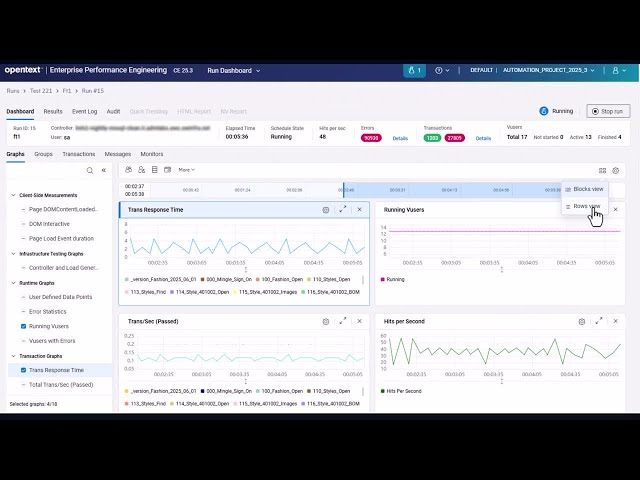
  • Dashboard. The online and offline dashboard was modernized with a new look and feel, and more streamlined functionality. For details, see Run Dashboard.

  • Runtime activity. The Add Vusers, Run Vusers, and Rendezvous dialog boxes were modernized with a new look and feel, and more streamlined functionality. For details, see Manage Vusers during a run and Set rendezvous policies.

Security and infrastructure
  • New Password Policy Setting. Added a new security setting that enforces a password change at the next login after an administrator sets or resets a user's password. For details, see Set the password policy.

OpenText VuGen, protocols, and OpenText Performance Engineering for Developers

Virtual User Generator (VuGen) includes the following enhancements. For details, see the OpenText Virtual User Generator What's New.

  • HashiCorp Vault support. You can now use API functions to access HashiCorp Vault secrets directly from your Vuser script.

  • Port mapping. When defining a new server entry for port mapping, you can now set a range for the SSL versions, for example from SSL 3.x to TLS 1.3.

VuGen and third-party protocols include the following enhancements. For details, see the OpenText Virtual User Generator What's New.

  • LLM. A new LLM (Large Language Model) protocol lets you create scripts for testing LLMs, such as OpenAI and Gemini.

  • TruClient 2.0 - Web. The following updates are included for TruClient 2.0 - Web scripts:

    • You can convert TruClient 2.0 - Web scripts to Web - HTTP/HTML format.

    • In the Runtime Settings > Log page, you can now specify the MIME types to log for the HTTP response body. This can reduce overhead that may impact performance.

    • Search functionality added, enabling you to search for text in the current view or the whole script. You can also use the Go to button to jump to a specified step.

    • Steps can be marked as optional, so that they are skipped if the target object is not found.

    • You can save steps in the Steps box as favorites, and quickly access them from the Favorites tab.

  • TruClient - Web. The following updates are included for TruClient - Web scripts:

    • TruClient scripts support Chromium browser version 137.

    • In the Runtime Settings > Log page, you can now specify the MIME types to log for the HTTP response body. This can reduce overhead that may impact performance.

  • DevWeb. The following updates are included for DevWeb:

    • You can configure DNS resolution to be performed per Vuser.

    • The Replay summary includes an additional column for Hits per IP.

  • Oracle. The Oracle - 2 Tier protocol now supports record and replay on Oracle Database 23ai.

  • Web - HTTP/HTML. An enhancement to the Chrome Recording extension allows you to indicate whether to capture HTTP authentication. You can disable this option to only record requests and responses without the login page.

  • Java. You can now experiment and run Java Vusers with unsupported versions of Java. You can also enable the scripting engine to use an unsupported Java version when generating Java code.

OpenText Performance Engineering for Developers (LoadRunner Developer) includes the following enhancements. For details, see the OpenText Performance Engineering for Developers What's new.

  • Trace-level logs. When using trace-level logging, you can choose to include or exclude the HTTP headers and/or HTTP body from the log. This provides control over the amount of detail included in the log.

  • InfluxDB. Support added for InfluxDB 3 database.

  • Trend Report. You can now view a report comparing test runs of your script. The Trend Report enables you to compare results for different data types, in bar or line format.

  • DNS resolution per Vuser. You can configure DNS resolution to be performed per Vuser. The obtained IP address is stored in the internal Vuser cache according to the defined Time to Live (TTL) policy. It is resolved again either when expired, or between iterations.

  • Postman Collection. You can now use the Offline Script Generator to generate a DevWeb script from a Postman Collection file. (Beta)

  • Observability with OpenTelemetry. This release introduces an integration with OpenTelemetry, providing observability support. The integration enables you to push telemetry data to an OpenTelemetry Collector when replaying scripts. (Beta)

  • gRPC code generation. This release includes the following improvements for gRPC protobuf code generation:

    • Improved information for payload structure.

    • A separate connect function for connecting to the server.

  • Unhide API. The new unhide enables the retrieval of hidden data in your script, for example, a user name or password..

Back to top

Whats new in version 25.1

Version 25.1 contains the following new features and enhancements.

Area Enhancement
User experience
  • Accessibility. Several pages, such as the login screens, now conform to VPAT accessibility standards and guidelines. This is part of an ongoing commitment to create accessible technologies and products.

  • Login page. The user login page has been split into two distinct phases to simplify the login process and enhance the user experience. For details, see Sign in.

  • JMeter scripts. You can now show the contents of JMeter script .csv files in the Script Details tab. For details, see Prerequisites.

Data and analytics
  • Datadog monitor. OpenText Enterprise Performance Engineering now integrates with Datadog™. You can set up the Datadog monitor, and view the collected data in online and offline test results and in analysis graphs. For details, see Datadog monitor.

Cloud and SaaS
  • OpenText Core Performance Engineering Analysis (Beta). OpenText Enterprise Performance Engineering integrates with OpenText Core Performance Engineering Analysis.

  • REST API. Additions to the REST API enable you to add a custom prefix to Azure and Amazon host templates to enable the customization of virtual machine names. For details, see the REST API references.

Integrations and ecosystem
  • Kubernetes orchestrator.

    • For each Kubernetes orchestrator account, you can define global limits for memory, CPU, and the number of pods. Setting these capacity limits can enhance inherent elasticity for Kubernetes by providing better control over resource allocation.

    • When using a Kubernetes orchestrator with Dockerized host images, you can specify security settings for all containers in the pod using the runAsGroup and fsgroup settings.

      For details, see Kubernetes configuration settings.

  • JMeter. External .jar files and plugins can be zipped and uploaded along with JMeter scripts to load generators. For details, see Set up and run a JMeter test.
  • REST API. Additions to the REST API allow you to manage host attributes and locations for auto-matching load generators. For details, see the REST API references.
Modernization
  • .NET 8. The application server backend and services were upgraded to .NET 8 to enhance security and functionality.

  • Oracle provider. The system has migrated to the native Oracle provider to ensure better integration with the Oracle database. This change impacts the upgrade process in Oracle-based environments. For details, see Install.

OpenText VuGen, protocols, and OpenText Performance Engineering for Developers

Virtual User Generator (VuGen) includes the following enhancements. For details, see the OpenText Virtual User Generator What's New.

  • FIPS-compliant encryption. You can now encrypt text in Vuser scripts using FIPS-compliant AES-256 encryption.

  • AWS Secrets Manager. The new integration with the AWS Secrets Manager supports use of the AWS service to retrieve secrets such as authentication credentials for your scripts.

VuGen protocols include the following enhancements. For details, see the OpenText Virtual User Generator What's New.

  • TruClient - Web. The following updates are included for TruClient - Web scripts:

    • TruClient Browser equivalent to Firefox version 130.

    • TruClient scripts support Chromium browser version 129.

  • TruClient 2.0 - Web. The following updates are included for TruClient 2.0 - Web protocol:

    • Support for:

      • Linux Ubuntu load generator on Docker

      • IP spoofing and TC.getUserIP() function (on Windows)

      • Non-standard file upload

      • Global function library for both Windows and Linux Ubuntu

    • You can now use the TruClient script converter to convert TruClient - Web scripts on other Performance Engineering platforms to TruClient 2.0 - Web format.

  • DevWeb. The following updates are included for the DevWeb protocol:

    • When recording HAR files with the Offline Script Generator, you can add time to web requests. This provides some control over the timeframe for recorded requests, enabling you to include or exclude requests from concurrent groups.

    • Improved correlation detection for script generation.

    • Support for IPv6 addresses. You can use the getIPList function to return IPs for version 4, 6, or both.

    • You can configure the WebSocket buffer to be generated as a function instead of a const string.

    • You can configure whether canonical form is used for HTTP request headers in a script.

  • Oracle. The following updates are included for Oracle protocols:

    • Oracle iferror handling supports using the retry interval received from the server.

    • Timer expiration can be handled by sending a terminate command, or by allowing the script to continue running.

    • These options are configured on the Client Emulation page in the runtime settings.

  • Web - HTTP/HTML. The following updates are included for the Web - HTTP/HTML protocol:

    • The web_custom_request function now includes a ResponseTime attribute, supported in C and JavaScript. This metric expands performance testing capabilities, including load testing for Large Language Model (LLM) engines.

    • MPEG-4 file format version 2 is supported for streaming media during recording and replay.

    • IPv6 is supported when recording scripts using the Listening IP option.

    • You can now configure the following options in the UI:

      • VTS port forwarding settings.

      • Turn off target server info caching.

      • Allow insecure renegotiation for legacy SSL implementations.

      • Use the CNG engine when replaying the script, instead of the default CAPI engine.

  • Citrix. Citrix protocol now supports Citrix Virtual Apps and Desktops 7 2402 (build version CU1_1100), and the corresponding Workspace version (full installer, build version 24.2.1000.1016).

  • SAP GUI. Auto logon is now supported using the SAP UI Landscape XML file.

  • 64-bit support. 64-bit support is now provided for the SAP Web, RDP, and Windows Sockets (WinSock) protocols.

OpenText Performance Engineering for Developers (LoadRunner Developer) includes the following enhancements. For details, see the OpenText Performance Engineering for Developers What's new.

  • ScalUP. When using ScalUp (previously ScaLRD) with OpenText Enterprise Performance Engineering (LoadRunner Enterprise), you can now define hosts attributes for the automatic host selection.

  • Use alternative scenario.yml. You can now define alternative scenario.yml files to use for script replay. You pass the location of the alternative file to use for the script from the command line.

Back to top

See also: