Share this page


Architecture
You can set up OpenText™ Software Delivery Management as a single node, or in a cluster configuration. The following diagrams illustrate the system architecture for both options.
These are followed by descriptions of each of the components.
Basic configuration
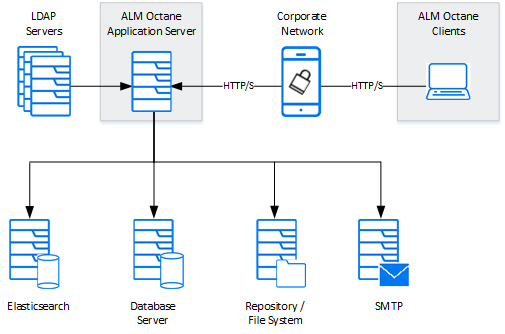
The following diagram illustrates the system architecture of a single-node configuration. Components in gray are OpenText products.
Note: The OpenText Software Delivery Management, database, and Elasticsearch servers should each reside on separate machines.

Enterprise configuration
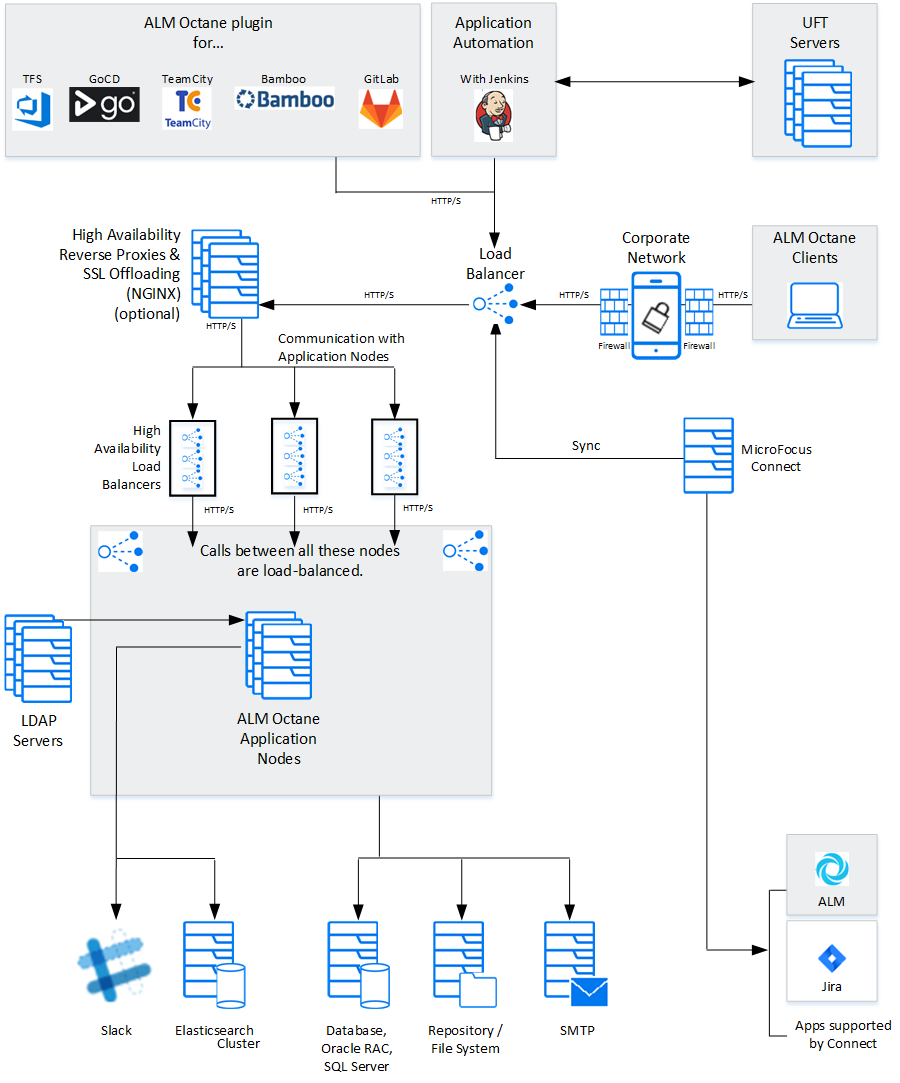
The following diagram illustrates the system architecture of an enterprise, cluster configuration. Components in gray are OpenText products.
Components
| Components | Description |
|---|---|
| OpenText Software Delivery Management clients | The clients communicate with the OpenText Software Delivery Management server over HTTP/S. |
| OpenText Software Delivery Management Server application nodes |
Client requests from OpenText Software Delivery Management are dispatched to the deployed application. Note: The OpenText Software Delivery Management, database, and Elasticsearch servers should each reside on separate machines. |
| OpenText Software Delivery Management application additional cluster (sync) nodes |
Cluster configuration: A cluster is a group of application servers that run as a single system. Each application server in a cluster is referred to as a "node."
|
| Repository / File system |
Stores all files to be used by all the projects in the system, such as templates and attachments. Cluster configuration: When working in a clustered configuration, the repository must be accessible by all nodes. Also, the repository must be configured to use the same mount point (path) on all nodes. |
| Database server |
A relational database management system, either Oracle RAC or Microsoft SQL Server. The database server stores the following schemas:
This server can be shared with other applications with the following constraints:
Note: The OpenText Software Delivery Management, database, and Elasticsearch servers should each reside on separate machines. |
| Elasticsearch server (or cluster) |
A Java-based, open-source search engine. This component is used for various aspects of the application, such as global search and trends. This server can be shared with other applications with the following constraints:
Note: The OpenText Software Delivery Management, database, and Elasticsearch servers should each reside on separate machines. A working Elasticsearch server is a requirement for working with OpenText Software Delivery Management. For the supported version, refer to the Support Matrix. |
| Load balancer |
Cluster configuration: When working with a load balancer, client requests are transmitted to the load balancer and distributed according to server availability within the cluster. If you are using a load balancer, we recommend you utilize SSL offloading. |
| High availability load balancers | Cluster configuration: These can be "VIPs" (virtual IP addresses) of one physical load balancer. |
| DMZ | An optional, demilitarized zone. |
| High availability reverse proxies and SSL offloading | Cluster configuration: Optional configuration for load balancing using a software solution (for example, NGINX). |
| SMTP | A mail server. |
| Jenkins (with OpenText Software Delivery Management plugin) |
Enterprise configuration: You can integrate OpenText Software Delivery Management with a Jenkins CI server using the Application Automation Tools Plugin on your CI server. |
| TFS, TeamCity, or Bamboo server (with OpenText Software Delivery Management plugin) |
Enterprise configuration: You can integrate OpenText Software Delivery Management with a TFS, TeamCity, or Bamboo CI server using the OpenText Software Delivery Management plugin on your CI server. |
|
Slack |
Integration with Slack, which enables all stakeholders of a backlog item to collaborate and communicate. You can integrate with Slack by adding it as a collaboration tool associating it with a workspace. |
| Open Text testing tools: OpenText Functional Testing, OpenText Functional Testing for Developers,OpenText Core Performance Engineering, OpenText Enterprise Performance Engineering |
You can integrate OpenText Software Delivery Management with Open Text testing tools. |
 See also: