Share this page


All Runs dialog box
This dialog box enables you to view previous run results. You can load a previous run in the My Runs List pane, view run results in the Storyboard, and view a run results summary.
| Option | Description |
|---|---|
| UI Example | 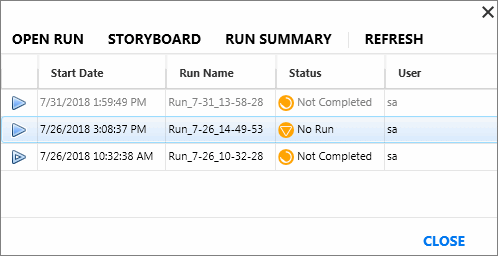 |
| To access |
In the My Runs List pane, right-click an entry and select Show All Runs. |
| Related tasks | |
| Important information |
If a test is running, it is displayed at the top of the list, but it is disabled. |
User interface elements are described below (unlabeled elements are shown in angle brackets):
|
UI Elements |
Description |
|---|---|
| Open Run |
Adds the selected run to the My Runs List tab. |
| Storyboard |
Opens the Storyboard window for the selected run. |
| Run Summary |
Displays the Run Summary for the selected run. |
| Refresh |
Refreshes the list of runs. |
| <Run list> |
The list of runs for the test. The run list displays the following columns:
|