Share this page


Create a .NET project in Visual Studio Code
In Visual Studio Code, on Windows and Linux, you can create NUnit 3 or MSTest 2 testing projects using the installed templates.
Prerequisites
- Internet connectivity is required when creating projects.
- .NET 6 or later
- We recommend that you use language-specific extensions such as C# Dev Kit, to add test project development capabilities to Visual Studio Code.
Create a project
You can create a new project in VS Code using Functional Testing for Developers extension GUI or the Command Palette.
To create a project:
-
Do one of the following:
-
Select the Functional Testing for Developers extension in the Activity Bar and expand the Templates > .NET menu.
-
Open the Command Palette (Ctrl + Shift + P) and type >FTD: Create .NET Project.
-
-
Select the relevant template type (NUnit 3 or MSTest 2).
-
Enter a name for the new project.
-
Select a project location. By default, Visual Studio Code suggests the user's Documents folder if there is no open workspace. Otherwise, it suggests the open workspace.
-
Optionally, select a target .NET version.
Visual Studio Code template content
The NUnit/MSTest FTD project templates include the following:
-
Reference to the HP.LFT.SDK and related HP.LFT.* elements
-
Reference to Microsoft.CSharp and, for OpenText Functional Testing for Developers NUnit projects, nunit.framework
- App.config, which enables you to customize some test settings. For details, see Customize test settings.
-
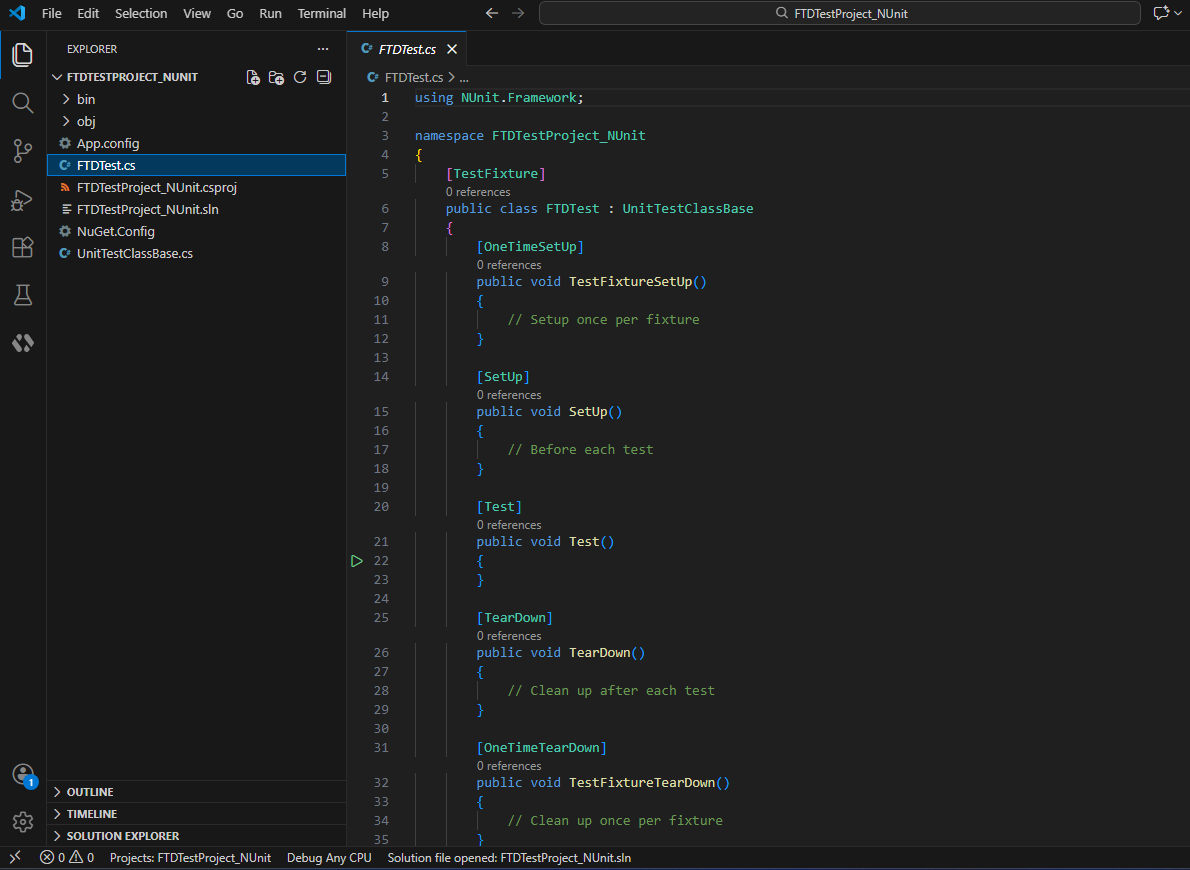
A basic FTDTest.cs template where you write your code.
You can include multiple tests in one class, and you can use the Object Identification Center or Test Recorder to help generate the code.
The exact structure of this template depends on whether you are using NUnit or MSTest. In both cases, they include attributes where you can define:
Attribute Description Setup code Runs once at the start of the class Setup code Runs once at the start of each test Individual test units - The template includes a single
[Test](NUnit) /[TestMethod](MSTest) attribute containing an emptyTest()/TestMethod()method. You can rename this method to whatever you want to call your test. - You can add multiple
[Test]/[TestMethod]attributes if you want to include several tests in your class. - Each
[Test]/[TestMethod]attribute should declare a void test method that contains the main code for that test.
Cleanup code Runs at the conclusion of each test Cleanup code Runs once at the end of the class - The template includes a single
- UnitTestClassBase.cs, which controls what happens during the different phases of your run, including running and closing the runtime engine.
Example: A new OpenText Functional Testing for Developers NUnit 3 project in Visual Studio Code:
For details on using the MSTest or NUnit 3 framework, see the official MSDN or NUnit 3 documentation.