Share this page


Known issues - Web technology
This section describes known issues when working with different web browsers.
Chrome and Edge
- The FireEvent OnBlur event is not supported.
- If a browser is open and has an alert message box displayed prior to the start of a test run, you must manually close the message box before starting the run.
-
Using the Forward method when the current browser page is about:blank throws an exception and fails the test.
Workaround: when on an about:blank page use the Navigate method instead of the Forward method.
-
Sometimes, after a browser page loads, operations on the page fail. For example a WebTable.SelectCell method may fail to select the cell.
Possible cause: The site continues to load data after the page is loaded, and the operation performed requires an object that is not ready.
Workaround: Instead of opening the browser using BrowserFactory, open the browser using a system process and attach it using BrowserFactory.
For example:
new ProcessBuilder("C:\\Program Files (x86)\\Google\\Chrome\\Application\\chrome.exe","<MyURL>").start();
Browser browser = BrowserFactory.attach(new BrowserDescription.Builder().title("<URL Title>").type(BrowserType.<TypeOfBrowser>).build());
IE mode on Edge
In your test, you must add a Sync or Thread.sleep() step, after launching the browser using the Edge type and navigating to the application's URL. This extra time is required for your web page to be fully loaded in IE mode before trying to run test steps on it.
Headless Chrome
-
If you run a test on Headless Chrome on a Mac, make sure that your test closes the browser by the end of the run. Otherwise, you cannot open Chrome again until you manually kill the Headless Chrome process.
-
SAPUI5-based applications are not supported on Headless Chrome.
-
Menu, TabStrip, and TreeView objects are not supported.
-
Cross-domain iFrame objects are not supported.
-
The following operations are not supported:
-
Drag-and-drop operations
-
Browser Dialog operations: HandleDialog, HasDialog, GetDialogText
-
ImageUtils operations
-
Browser.ClearCache
-
BrowserFactory.GetAllOpenBrowsers
-
WebFile.Set()
-
VRI
-
-
BrowserFactory.Attach. You can attach only to the first tab for each browser. You cannot attach to a tab opened from the web page or by an Open New Tab command.
Internet Explorer
-
When using Internet Explorer 11 on a computer with UAC enabled:
If a step in the test navigates from a protected-mode zone to a non-protected-mode zone, the navigation step succeeds, but any subsequent step fails.
Workaround: Reattach to the browser by calling BrowserFactory.Attach and then continuing with the browser that is returned.
- When running tests in parallel on Internet Explorer 11, snapshots for controls received by the findChildren method do not appear in the run results report.
- When recording on Internet Explorer on a computer with UAC enabled, whenever you browse from a protected-mode zone to a non-protected-mode zone, an additional browser-launch step is recorded.
Multiple instances
You cannot open more than one instance of the Edge browser. This includes multiple BrowserFactory.Launch methods without closing the previous instances, or other methods that create a new browser instance such as Browser.OpenNewTab
Frame or iFrame objects
You cannot spy on or run steps on Frame or iFrame objects, or any elements inside these objects, using Microsoft Edge.
Unsupported methods
The following methods are not supported in Microsoft Edge:
-
FullScreen()
-
DeleteCookies()
- File.SetValue()
PhantomJS
Menu, TabStrip, and TreeView objects are not supported.
The following operations are not supported:
- Drag-and-drop operations
- Browser Dialog operations: HandleDialog, HasDialog, GetDialogText
- WebFile.Set() operation
- ImageUtils operations
- VRI
Safari
-
Web pages that modify the browser's JavaScript functionality (for example, a web page that replaces the JSON object) may cause OpenText Functional Testing for Developers to behave unexpectedly.
-
The font and color properties for link objects contain different values in different browsers.
- Safari does not work on Mac using a remote access window.
- You cannot use the test recorder to record test steps on applications in Safari.
Test Objects, Methods and Properties
-
When using Safari, the innertext, outertext, innerhtml and outerhtml property values may differ from other browsers. Therefore, using these values in parameters may cause the steps to fail.
-
The following test objects, methods, and other Web-specific functionalities are not supported in Safari:
-
ViewLink test object
-
about://* pages
-
Browser.Home method
-
Browser.FullScreen method
-
Browser.Object method
- Modal or modaless dialog boxes
- Developer Tools pane. (Running steps or Safari while the Developer Tools pane is open is supported.)
-
Dialog boxes opened by the browser, such as Alert, Confirmation, or Prompt messages.
-
WebXML test object (and, accordingly, XML checkpoints and output value steps).
- Web-based environments, such as Web-based SAP, Siebel, Java, or .NET Web Forms.
-
Other
-
Web 2.0 test objects or Web Add-in Extensibility-based test objects are not supported on Safari
-
The following test objects and test object methods are not supported when running on Safari:
-
WebFile.Set method
-
Browser.ClearCache method
-
Browser.DeleteCookies method
-
Drag & Drop methods (on all Web test objects)
-
Web test objects located inside iFrame controls with a blank or about:blank SRC value.
-
-
During a run session, steps that click on a Web object that is supposed to open a new browser tab fail to open the new tab.
Workaround: Deactivate the popup blocker in Safari. (Safari > Preferences > Security, clear the Block pop-up windows checkbox).
-
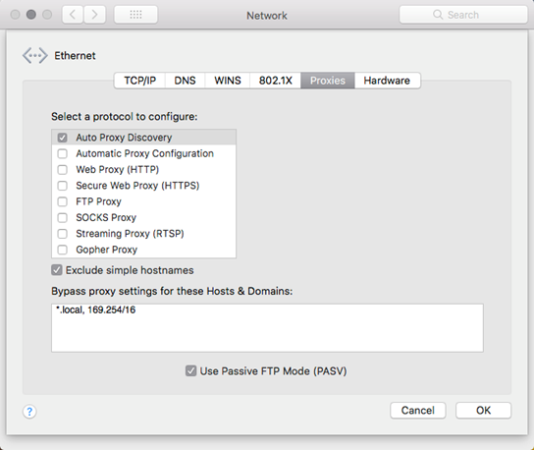
In some configurations, the Object Identification Center and test runs do not work properly on the first browser tab that is opened.
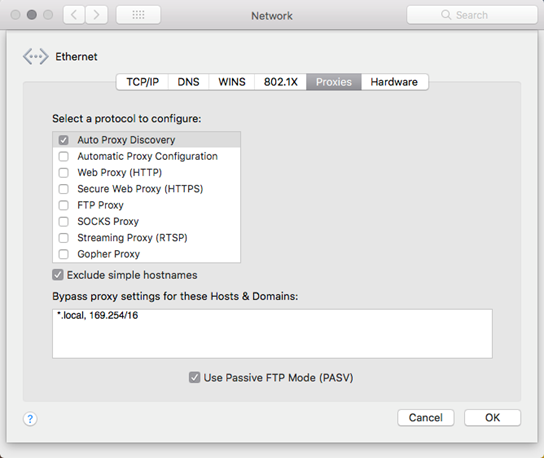
Workaround: Select the Auto Proxy Discovery protocol in your network settings:
Firefox
You may want to remove unused OpenText Functional Testing Agent extensions from Firefox manually:
-
The Firefox extension is not removed after you uninstall OpenText Functional Testing for Developers.
-
The old extension is kept in Firefox after you upgrade OpenText Functional Testing for Developers and a new extension is installed.
Attributes property (C#) or getAttributes property (Java)
In some cases, the Attributes collection returned by Attributes property (C#) or getAttributes (Java) may be different between Internet Explorer and other browsers such as Chrome or Firefox.
Navigating to a new page
If you perform a step that opens a new page immediately followed by an image capture operation such as OCR operations, image verifications or comparisons (VerifyImageMatch, VerifyImageExists, CompareImage, LocateImage) or the GetSnapshot method, the step may fail.
Workaround: Add a browser.Sync() step before your image capture operation.
SAPUI5
If the SAPUI5 add-in is loaded (selected in Settings > Engine tab ), Web TreeView, Menu, or TabStrip test object types cannot be recognized.