Share this page


Custom toolbar buttons
You can add custom buttons to entity toolbars so users can launch external behavior in context of selected items.
Overview
A custom button can open an external web app (HTTP/HTTPS) or another registered desktop protocol-handler URI, such as mailto:.
The custom button passes runtime context from OpenText Core Software Delivery Platform to the target app through URL query parameters, for example: selected IDs, workspace, user info.
The web app invoked by the custom button can either open in a separate tab or be embedded as an iframe in an OpenText Core Software Delivery Platform dialog box.
The web app can use OpenText Core Software Delivery Platform's REST API to update data, and trigger UI behavior in OpenText Core Software Delivery Platform using a set of supported events.
Top-level workflow
-
Build the target implementation
Implement the target web app or handler endpoint that receives query parameters/tokens.
-
Handle supported events
Optionally, implement message posting logic in the target app using
window.openerorwindow.parent. See Supported events. -
Create the custom button JSON configuration object
Add required and optional properties, including the tokenized URL that calls the target web app or endpoint. See JSON object.
-
Add runtime URL query parameters
Optionally include URL tokens for runtime context, such as selected entity IDs, workspace, and user info. See Runtime URL query parameters.
-
Deploy the custom button
Register the button as an external action, either by uploading a bundle or defining it in the external action editor. See External actions.
The external app
The custom button launches a browser-based external application.
Architecture context
-
The external app runs independently from OpenText Core Software Delivery Platform.
-
It can include UI logic, data processing, and integrations with other systems.
-
To interact with data from OpenText Core Software Delivery Platform, the code can include REST API requests.
-
If the external app is intended to open in a dialog box, it must be suitable for iframe embedding.
-
The host passes runtime context (selection, workspace, user, URL tokens) to the app at launch time.
-
The app can run in one of two ways:
-
Frontend-only: Suitable when required operations can be handled from client-side code.
-
External app with backend: Preferred for privileged operations, aggregation across systems, and restricted/internal integrations.
-
-
Hosting model: The following hosting options are available:
-
UI-only apps with no backend can be uploaded to OpenText Core Software Delivery Platform or hosted on an external server.
-
Apps with a backend can only be hosted externally.
-
If hosted externally, trust must be established between the OpenText Core Software Delivery Platform server and the external server. For details, see CORS for external actions.
-
If the external app has a backend and needs to verify the invoking user, see User verification for external actions.
-
Supported events
The external application can send instructions back to OpenText Core Software Delivery Platform using a set of supported events.
In practice, this means:
-
The custom button opens your target web app.
-
Your app performs an action on an item, such as updating data or creating an item.
-
Your app posts an event message so that OpenText Core Software Delivery Platform refreshes the UI, navigates, or closes/updates the dialog box.
Preconditions and transport
-
In the custom button JSON, set
events: true. -
For actions opened in a new browser tab, post messages using
window.opener. -
For actions embedded in a dialog, post messages using
window.parent. -
Include the expected context values in each message (
shared_space,workspace, and dialog/panel identifier when relevant), so the host can accept and route the message.
Supported events for custom buttons
| Event | Purpose |
|---|---|
octane_refresh_entity
|
Instruct OpenText Core Software Delivery Platform to refresh specified entities after they were updated in the external application. |
octane_display_entity
|
Instruct OpenText Core Software Delivery Platform to open/display the details of a specified entity. |
octane_entity_was_added
|
Notify OpenText Core Software Delivery Platform that a new entity was created so it is displayed where relevant (as if it were created in OpenText Core Software Delivery Platform). |
octane_refresh_list
|
Instruct OpenText Core Software Delivery Platform to refresh the full grid/list after updates made in the external application. |
octane_select_entity
|
Instruct OpenText Core Software Delivery Platform to select specified entities in the grid/list. |
octane_set_dialog_title
|
If the action is opened in a dialog, set that dialog's title. |
octane_close_dialog
|
If the action is opened in a dialog, close the dialog. Can include refresh behavior. |
octane_read_settings
|
Query the current user's settings for the application or a specified module. Results are returned in JSON. |
octane_update_settings
|
Add/update a value in settings (stored in the text key). |
octane_report_error
|
Instruct OpenText Core Software Delivery Platform to add an entry to its errors log. |
Note: If an entity is currently being edited with unsaved changes, some refresh operations may be intentionally suppressed to prevent data loss.
Code examples
Use these examples as implementation starters. Replace hardcoded values with runtime values in your app.
Set dialog title (embedded dialog)Your custom button opens in a dialog and sets a contextual title.
var message = {
  event_name: 'octane_set_dialog_title',
  shared_space: params.shared_space,
  workspace: params.workspace,
  data: {
    dialog_id: params.dialog_id,
    title: 'Defect Review',
  },
};

window.parent.postMessage(message, '*');The action completes inside a dialog and refreshes the originating view.
var message = {
  event_name: 'octane_close_dialog',
  shared_space: params.shared_space,
  workspace: params.workspace,
  data: {
    dialog_id: params.dialog_id,
    refresh: true,
  },
};

window.parent.postMessage(message, '*');The action opens in a separate tab and updates specific entities that should be refreshed in the host.
var message = {
  event_name: 'octane_refresh_entity',
  shared_space: params.shared_space,
  workspace: params.workspace,
  data: {
    entity_type: 'work_item',
    entity_ids: ['1003', '4005'],
  },
};

window.opener.postMessage(message, '*');
JSON object
The JSON object is the action definition that tells OpenText Core Software Delivery Platform how a custom button should be exposed and executed. It defines where the button appears, what it launches, what runtime context is passed, and whether the target app can send supported events back to the host UI.
The JSON object can either be part of the external application's locally hosted bundle, or added to the external action editor. For details, see External actions.
Dialog-based custom button example
{
  "name": "defect-review-dialog",
  "title": "Defect Review",
  "entity_type": ["defect"],
  "views": ["list", "details"],
  "icon": "details",
  "url": "https://server.domain.com/review?entity_ids={entity_ids}&workspace={workspace}&shared_space={shared_space}&dialog_id={dialog_id}",
  "single_entity": true,
  "events": true,
  "dialog": "large",
  "workspaces": [1002, 1004]
}
JSON property reference
| Property | Purpose | Notes |
|---|---|---|
name
|
Required. Unique action name for identification/logging. | Keep stable once used. |
title
|
Required. Button label or tooltip, depending on toolbar presentation. | If icon-only toolbar, this becomes tooltip text. |
entity_type
|
Required. Entity types where button applies. | REST entity names; aggregated types like work_item supported. |
views
|
Required. Where button appears. | Allowed: list, details. |
url
|
Required. Target URL/URI launched by button. Can be a direct URL/URI or a parameterized URL template resolved at click time with runtime context values. The executable entry file should be referenced from |
|
icon
|
Icon shown for button. | Choose from supported icon set. See Icons. |
single_entity
|
Selection constraint. | true = one selected item only, false = one or many, null = even none selected. |
events
|
Whether target app can send supported events back. | Default false; set to true only if the external app posts events to the host (for example, via window.opener or window.parent). See Supported events. |
dialog
|
Embed target in dialog instead of new tab. | Allowed: small, medium, large. |
workspaces
|
Allow-list of workspace IDs. | Cannot be used with exclude_workspaces. |
exclude_workspaces
|
Deny-list of workspace IDs. | Cannot be used with workspaces. |
By default, URL/URI use is restricted to common protocols like https and mailto. To allow additional protocols, configure site parameter ENTITY_EXTERNAL_ACTIONS_SUPPORTED_PROTOCOLS.
Runtime URL query parameters
The parameterized URL is the handoff contract between the custom button definition and your target application.
You write the parameterized url once in the button JSON. At runtime, OpenText Core Software Delivery Platform replaces these placeholders with actual context values before invoking the target URL. Your target application then receives a regular URL with concrete query values.
Example parameterized url value:
https://server.domain.com/some-application?entity_ids={entity_ids}&entity_type={entity_type}&shared_space={shared_space}&workspace={workspace}&user_login={user_login}&email={user_email}&action=defect-detailsSupported URL parameters
| Parameter | Purpose |
|---|---|
{entity_ids}
|
Comma-delimited list of selected entity IDs. Limited to first 500 items when all items are selected in a grid or board view or when no items are selected. |
{entity_type}
|
Aggregated type of the selected entity (for example, defect becomes work_item). |
{query}
|
REST filter representing the current grid/board view. Particularly useful when Select all is active or when >500 items are selected, as it retrieves all matching items rather than being capped at 500. |
{all_selected}
|
Boolean value (true or false) indicating whether all items in the current view are selected. Helps determine if entity_ids is limited to the first 500 items. |
{shared_space}
|
ID of the space in which the action was triggered. |
{workspace}
|
ID of the workspace in which the action was triggered. |
{user_login}
|
Login name with which the invoking user connected to OpenText Core Software Delivery Platform. |
{user_email}
|
Email address of the invoking user as recorded in OpenText Core Software Delivery Platform. |
{octane_url}
|
Base URL of the OpenText Core Software Delivery Platform site from which the action is invoked. |
{dialog_id}
|
Context identifier used by dialog-based actions to post messages back to the host UI (for example, set title or close dialog). |
{xsrf_token}
|
Security token for POST requests and scenarios where external server interactions require XSRF protection. For details, see CORS for external actions. |
{user_identity_token}
|
JWT token that lets the target app verify the identity of the invoking OpenText Core Software Delivery Platform user. For details, see User verification for external actions. |
Icons
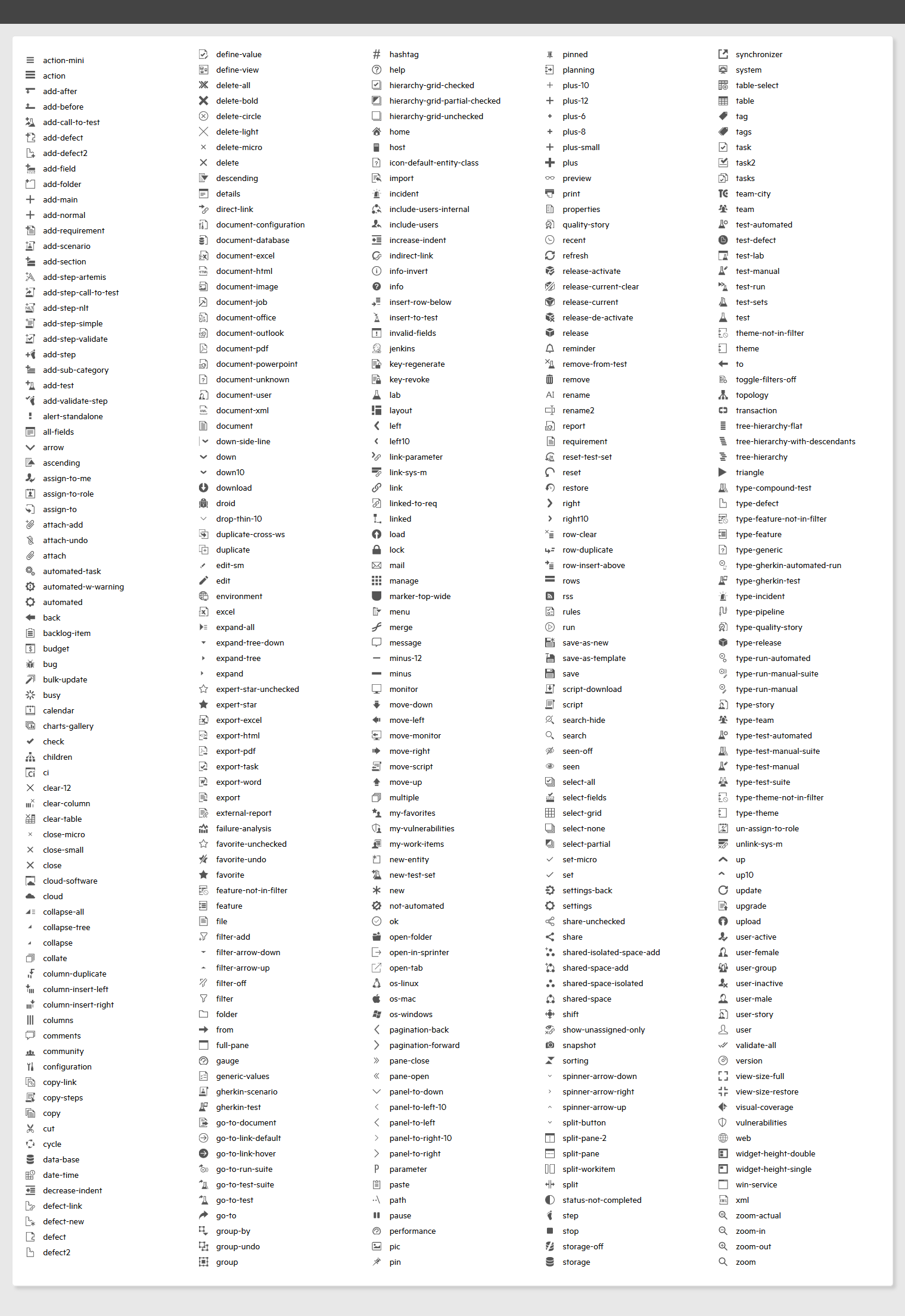
Choose an icon from the list below to use for the custom button.
Tip: To view in full detail, click to zoom in, then right-click the image and open in a new tab.