Share this page


What's new
This topic introduces the new features and improvements in OpenText Core Performance Engineering CE 26.1.

AI-driven Performance Engineering
This release includes enhancements to the AI-powered, virtual assistant for OpenText Performance Engineering solutions and to MCP support.
| Area | Enhancement |
|---|---|
| Core Performance Engineering Aviator |
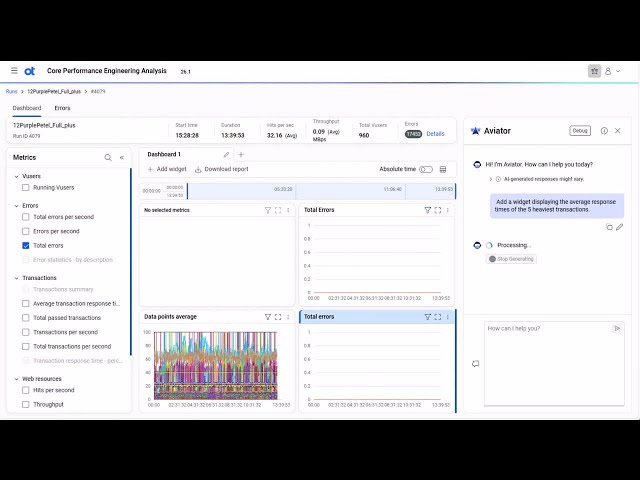
Core Performance Engineering Aviator service Core Performance Engineering Aviator is a cloud-based enterprise service that delivers Artificial Intelligence (AI) capabilities to extend functionality within OpenText Performance Engineering products that are connected to this paid service. Aviator provides scripting support for performance engineering products through VuGen and automated, AI‑assisted analysis through Core Performance Engineering Analysis. For details on supported client instances and integrating with Aviator, see OpenText Core Performance Engineering Aviator. AI-driven scripting assistance Aviator for Scripting in VuGen is generally available for all users. It provides assistance throughout the scripting process, helping to save time and simplify script creation. Aviator for Scripting includes the following key capabilities:
When used together, these features save time and reduce the skill sets required for scripting. For details, see Aviator for Scripting in the OpenText Virtual User Generator Help Center. AI-driven data analysis Aviator for Analysis in Core Performance Engineering Analysis is generally available for all users. It includes the following key capabilities:
For details, see Aviator for Analysis in the OpenText Core Performance Engineering Analysis Help Center. |
| MCP support |
MCP support is now available, providing a standardized and secure way to leverage AI-driven natural-language prompts to streamline and automate performance engineering workflows. This release includes the following MCP servers: MCP server for Core Performance Engineering MCP server for Core Performance Engineering enables natural‑language access to tenant data and actions through your preferred MCP client. For details, see MCP integration. MCP server for DevWeb DevWeb now supports MCP. Using Microsoft Copilot in Visual Studio Code, natural language can be used to interact with the DevWeb MCP server to perform common tasks such as:
For details, see the OpenText Performance Engineering for Developers Help Center. |
User experience
This release includes the following enhancements to the user experience.
| Area | Enhancement |
|---|---|
| Scripts |
You can group scripts by Type and Author. This enables you to apply bulk updates, such as deletions, to particular groupings. For details, see Scripts. |
| Licenses |
The latest allocation snapshot is now stored for each VU/VUH license, including expired licenses. This gives administrators visibility into how the license was recently allocated to projects, making it easy to reassign allocations after adding a new or renewed license. You can also export allocation details for active and inactive licenses. For details, see License allocation. Note: The system does not link new licenses to prior licenses, so snapshots are not carried over between licenses. |
Modernization
This release includes the following modernization updates.
| Area | Enhancement |
|---|---|
| User interface |
The user interface has been restyled and modernized to deliver a more consistent and accessible experience. Key improvements include:
|
Integrations and ecosystem
This release includes the following integrations and ecosystem updates.
| Area | Enhancement |
|---|---|
| Git |
The Git integration has been enhanced for faster updates. Windows and Linux agents now reflect new commits in the UI within 30 seconds (previously 2 minutes). The synchronization interval is configurable and can be reduced to as low as 5 seconds using the STORM_GIT_SYNC_INTERVAL parameter. For details, see Git integration. |
| Core Performance Engineering Analysis |
Added support for streaming the following data to OpenText Core Performance Engineering Analysis:
For details, see OpenText Core Performance Engineering Analysis integration. |
Security and infrastructure
This release includes the following security and infrastructure updates.
| Area | Enhancement |
|---|---|
| Cookie preferences |
Cookie preferences are now saved for every user. You can set cookie preferences in the Settings menu. For details, see Banner buttons. |
VuGen and protocols
OpenText Virtual User Generator (VuGen) includes the following enhancements. For details, see the VuGen What's New.
| Area | Enhancement |
|---|---|
| Windows OPLG | The silent installation process for Windows OPLG has been improved, enabling you to define the server URL once in the YAML file and deploy it to multiple machines in a single step. For details, see Perform a silent OPLG installation. |
| VTS |
The Virtual Table Server includes the following updates:
|
VuGen protocols include the following enhancements. For details, see the VuGen What's New.
| Area | Enhancement |
|---|---|
| Finance ISO | Added support for the Finance ISO protocol, enabling you to create a Vuser script to monitor financial transactions using the ISO-8583 standard. The protocol provides metrics on the send and receive messages between the server and the client. |
| TruClient 2.0 - Web |
|
| TruClient - Web |
|
| Java protocols | Support for Oracle JRE/JDK version 25. |
OpenText Performance Engineering for Developers includes the following enhancements. For details, see the What's new.
| Area | Enhancement |
|---|---|
| Third-party integrations | Documentation added for using node modules to incorporate third-party APIs in DevWeb scripts. |
Deprecation notices
This release includes the following deprecation notices.
| Area | Description |
|---|---|
| TruAPI | TruAPI is planned for removal in a future version. |
For a complete list of deprecated items and planned removals, see Deprecated features and functionality.
 See also: