Share this page


What's new
This topic introduces the new features and enhancements in version 26.1 for VuGen and the script protocols.
What's new video
Learn about some of the new features included in version 26.1.
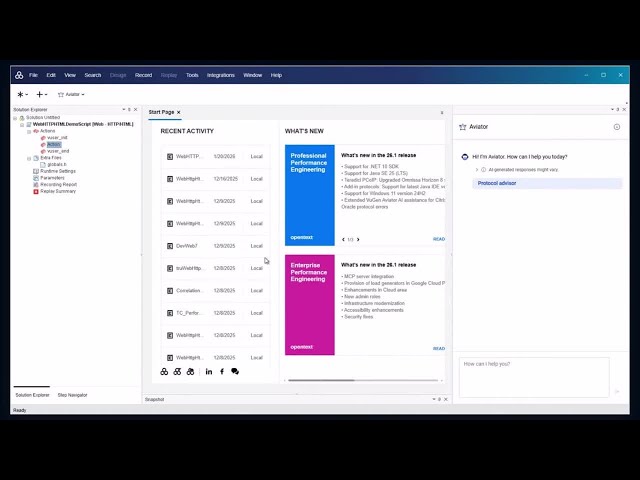

AI-driven Performance Engineering
This release includes the following enhancements for AI-driven Performance Engineering.
| Area | Enhancement |
|---|---|
| Core Performance Engineering Aviator |
Core Performance Engineering Aviator service Core Performance Engineering Aviator is a cloud-based enterprise service that delivers Artificial Intelligence (AI) capabilities, to extend functionality within OpenText Performance Engineering products that are connected to the paid Aviator service. Aviator provides scripting support for performance engineering products through VuGen, and automated, AI‑assisted analysis through Core Performance Engineering Analysis. For details on supported client instances and integrating with Aviator, see OpenText Core Performance Engineering Aviator in the OpenText Core Performance Engineering Help Center. AI-driven scripting assistance Aviator for Scripting in VuGen is generally available for all users. It provides assistance throughout the scripting process, helping to save time and simplify script creation. Aviator for Scripting includes the following key capabilities:
When used together, these features save time and reduce the skill sets required for scripting. For details, see Aviator for Scripting. AI-driven data analysis Aviator for Analysis in OpenText Core Performance Engineering Analysis is generally available for all users. It includes the following key capabilities:
For details, see Aviator for Analysis in the OpenText Core Performance Engineering Analysis Help Center. |
|
MCP support |
MCP support is now available, providing a standardized and secure way to leverage AI-driven natural-language prompts to streamline and automate performance engineering workflows. This release includes the following MCP servers: MCP server for Core Performance Engineering Enables natural‑language access to tenant data and actions through your preferred MCP client. For details, see MCP integration in the OpenText Core Performance Engineering Help Center. MCP server for DevWeb Using Copilot in Microsoft Visual Studio Code, natural language can be used to interact with the DevWeb MCP server to perform common tasks such as:
For details, see MCP integration in the OpenText Performance Engineering for Developers Help Center. |
User experience
This release includes the following enhancements to the user experience and user interface.
| Area | Enhancement |
|---|---|
| VTS |
The Virtual Table Server includes the following updates:
For details, see Virtual Table Server. |
Security and infrastructure
This release includes the following security and infrastructure enhancement.
| Area | Enhancement |
|---|---|
| Chrome extension |
The Web Recorder extension for Chrome is now excluded from the product installation. This is in compliance with Chrome versions 142 and higher that no longer support local extensions. As a result, the Web Browser via Extension option was removed from the Start Recording dialog box. You can however, install the extension manually. For details, see Record a script with the Web Recorder. |
Protocols
This release includes the following protocol enhancements.
| Area | Enhancement |
|---|---|
| TruClient 2.0 - Web |
|
| TruClient - Web |
For details, see TruClient - Web protocol. |
| Teradici PCoIP |
Support for Omnissa Horizon 8 is upgraded to versions 2406 and 2506. For details, see Teradici PCoIP protocol. |
| .NET+ |
The .NET+ protocol now supports the .NET 10 SDK. For details, see .NET+ protocol. |
| Web protocols |
For details, see Web protocols (generic). |
| Java protocols |
Support for JRE/JDK version 25. For details, see Java protocols. |
| Add-in protocols |
The add-in protocols now support the latest Java IDE versions. For details, see Supported Protocols. |
Integrations and ecosystem
This release includes the following integrations and ecosystem enhancements. For details, see Support Matrix.
| Area | Enhancement |
|---|---|
| Operating system |
Support added for Windows 11 version 24H2. |
| Java support | Support added for Java SE 25 (LTS). |
Security and infrastructure
This release includes the following security and infrastructure enhancement. For details, see Support Matrix.
| Area | Enhancement |
|---|---|
| OpenSSL | Support upgraded to OpenSSL 3.5. |
 See also: