Share this page


What's new
This topic introduces the new features and improvements in OpenText Enterprise Performance Engineering CE 26.1. To view enhancements for prior releases, see What's new in earlier versions.

AI-driven Performance Engineering
This release includes the following enhancements for AI-driven Performance Engineering.
| Area | Enhancement |
|---|---|
| Core Performance Engineering Aviator |
Core Performance Engineering Aviator service Core Performance Engineering Aviator is a cloud-based enterprise service that delivers Artificial Intelligence (AI) capabilities to extend functionality within OpenText Performance Engineering products that are connected to this paid service. Aviator provides scripting support for performance engineering products through VuGen and automated, AI‑assisted analysis through Core Performance Engineering Analysis. For details on supported client instances and integrating with Aviator, see OpenText Core Performance Engineering Analysis Aviator in the OpenText Core Performance Engineering Help Center. AI-driven scripting assistance Aviator for Scripting in VuGen is generally available for all users. It provides assistance throughout the scripting process, helping to save time and simplify script creation. Aviator for Scripting includes the following key capabilities:
When used together, these features save time and reduce the skill sets required for scripting. For details, see Aviator for Scripting in the OpenText Virtual User Generator Help Center. AI-driven data analysis Aviator for Analysis in Core Performance Engineering Analysis is generally available for all users. It includes the following key capabilities:
For details, see Aviator for Analysis in the OpenText Core Performance Engineering Analysis Help Center. |
| MCP support |
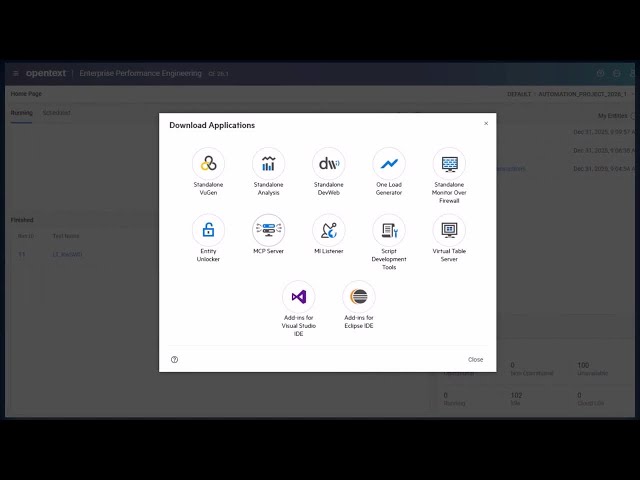
MCP support is now available, providing a standardized and secure way to leverage AI-driven natural-language prompts to streamline and automate performance engineering workflows. This release includes the following MCP servers: MCP server for Enterprise Performance Engineering MCP server for Enterprise Performance Engineering enables you to run performance tests using natural language. Now you can create, manage, and run tests through external AI tools just by typing prompts in your favorite MCP client provider. For details, see MCP integration. MCP server for DevWeb DevWeb now supports MCP. Using Copilot in Microsoft Visual Studio Code, natural language can be used to interact with the DevWeb MCP server to perform common tasks such as:
For details, see the OpenText Performance Engineering for Developers Help Center. |
User experience
This release includes the following enhancements to the user experience and user interface.
| Area | Enhancement |
|---|---|
| Admin roles |
New Admin user roles are now available with the following permissions.
For details, see Admin users and roles. |
| Logs | A new Dashboard API log is available in Site Management, providing real-time access to online errors. For details, see Check tenant log files. |
Cloud and SaaS
This release includes the following cloud and SaaS updates.
| Area | Enhancement |
|---|---|
| Google Cloud Platform | This release introduces support for hosting load generators in the cloud using a Google Cloud Platform (GCP) account. For details, see Cloud accounts. |
| Cloud account enhancements |
Support was added for the following:
For details, see Cloud accounts. |
Integrations and ecosystem
This release includes the following integrations and ecosystem updates.
| Area | Enhancement |
|---|---|
|
Core Performance Engineering Analysis |
Added support for configuring an OpenText Core Performance Engineering Analysis server using proxy authentication. For details, see OpenText Core Performance Engineering Analysis integration. |
| Windows Docker images | Added the ability to run Docker images on Windows node pools. For details, see Run Windows Docker images. |
| REST APIs | Added support for getting a list of host locations with host name and ID. For details, see Get host location in REST API references. |
Modernization
This release includes the following modernization updates.
| Area | Enhancement |
|---|---|
| User interface |
The user interface has been refreshed to deliver a more consistent experience. Key improvements:
For details, see Main navigation. |
VuGen and protocols
Virtual User Generator (VuGen) includes the following enhancements. For details, see the VuGen What's New.
| Area | Enhancement |
|---|---|
| VTS |
The Virtual Table Server includes the following updates:
|
VuGen protocols include the following enhancements. For details, see the VuGen What's New.
| Area | Enhancement |
|---|---|
| TruClient 2.0 - Web |
|
| TruClient - Web |
|
| Teradici PCoIP | Support for Omnissa Horizon 8 is upgraded to versions 2406 and 2506. |
| .NET+ | The .NET+ protocol now supports the .NET 10 SDK. |
| Web protocols |
|
| Java protocols | Support for Oracle JRE/JDK version 25. |
| Add-in protocols | The add-in protocols now support the latest Java IDE versions. |
OpenText Performance Engineering for Developers includes the following enhancements. For details, see the What's new.
| Area | Enhancement |
|---|---|
| ScalUP | When running ScalUP for DevWeb tests on OpenText Enterprise Performance Engineering, you can now specify a location for automatch hosts. You can also run a command to obtain a list of available host locations. |
| Use CSV data | You can run DevWeb scripts using data in a CSV file, rather than manually coding your test (Beta feature). |
| New SLA rule | You can now use the Passed Transaction Rank Percentile rule in your SLAs. This rule validates if transaction duration measurements meet a percentile rank, for passed transactions only |
| Third-party integrations . | Documentation added for using node modules to incorporate third-party APIs in DevWeb scripts. |
 See also: