Share this page


What's new in 2020 SP2 – SP3
Check out the new features and improvements for OpenText Enterprise Performance Engineering 2020 service pack 2 (SP2) and service pack 3 (SP3).
What's New videos
Watch the What's New in OpenText Enterprise Performance Engineering 2020 SP2 and SP3 videos:
What's New in 2020 SP3
What's New in 2020 SP2

What's new in OpenText Enterprise Performance Engineering 2020 SP3
OpenText Enterprise Performance Engineering 2020 SP3 contains the following new features and enhancements.
| Feature | Description |
|---|---|
| Elastic cloud-based load generators |
Cloud-based load generator enhancements include:
|
| Quick Trending |
Added the ability to perform quick trending analysis on failed transactions in test runs from the Test Management and Test Runs pages. View a summary of failed transactions, and then drill down and compare them against previous runs to identify trends and resolve issues. For details, see Perform quick trending analysis. |
| Shared Analysis |
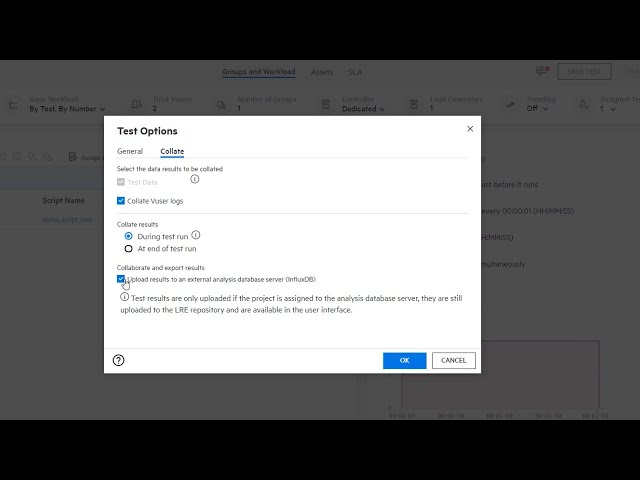
Made improvements to the runtime collate feature and added an option to upload raw results to an external analysis database server. This enables collaboration and viewing the data in third-party dashboards. For details, see Configure collate options. |
| UFT One integration |
Added support for uploading and running OpenText Functional Testing tests (GUI and API) directly from OpenText Enterprise Performance Engineering. For details, see OpenText Functional Testing tests. |
| Script enhancements |
Added support for:
|
| Site Management |
The following highlights the key enhancements made to the Site Management console for multi-tenant environments:
|
| User types |
User type enhancements include:
For details, see Predefined admin roles. |
| Import hosts from an Excel file | Added the ability to import hosts to the Hosts grid from an Excel file. For details, see Import hosts from Excel. |
| Connection Audit |
Added the ability to track user login and logout connections to OpenText Enterprise Performance Engineering and Administration. For details, see Audit entities and user connections. |
| SLA Violations report | Added the SLA Violations report (shows the X worst transactions that exceeded the SLA boundary during the run) to the HTML report and the Analysis Summary Report. For details, see the Analysis section of the OpenText Professional Performance Engineering Help Center. |
| UI improvements |
User interface enhancements include:
|
| REST APIs |
OpenText Enterprise Performance Engineering’s support for API testing now includes the following updates:
|
What's new in OpenText Enterprise Performance Engineering 2020 SP2
OpenText Enterprise Performance Engineering 2020 SP2 contains the following new features and enhancements.
| Feature | Description |
|---|---|
|
Multi-tenancy |
OpenText Enterprise Performance Engineering's multi-tenancy feature enables you to create multiple shared spaces (tenants) on a single OpenText Enterprise Performance Engineering server. For details, see Multi-tenancy. |
|
CloudBurst load generators |
Added support for running load generators on the cloud using an CloudBurst account. This enables you to dynamically provision hosts on demand without having to manage complex infrastructures or maintain subscriptions with cloud providers. Note: CloudBurst load generators are no longer supported in OpenText Enterprise Performance Engineering. |
|
Redesigned Performance Test Designer |
Redesigned and modernized the Performance Test Designer and added the following features:
For details, see Performance Test Designer. |
| Script enhancements |
|
| Remote host installations |
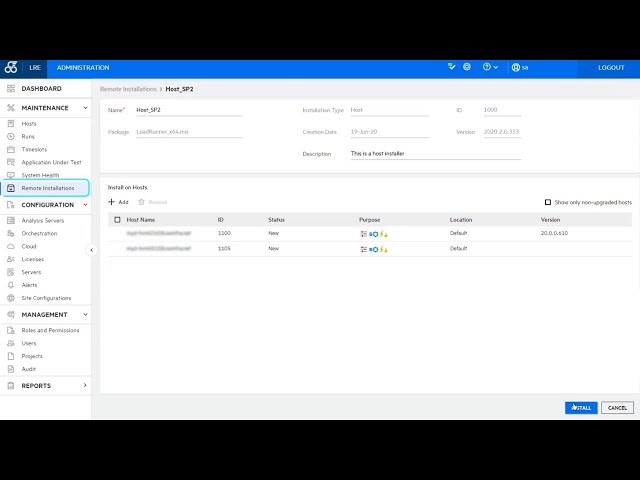
You can remotely upgrade OpenText Enterprise Performance Engineering host and standalone load generator machines from OpenText Enterprise Performance Engineering 2020.x to the latest OpenText Enterprise Performance Engineering version using the Remote Installation feature. Note: This replaces the patch installer that was available in earlier OpenText Enterprise Performance Engineering versions. |
| Integration with the Dynatrace SaaS platform |
Integration with the Dynatrace SaaS platform, enabling you to view performance data collected by the monitor in the Controller and Analysis. For details, see Dynatrace SaaS and Managed monitors. |
| PostgreSQL support |
Added support for deploying OpenText Enterprise Performance Engineering on a PostgreSQL database server. For details, see Install. |
| Import users from an Excel file |
Added the ability to import users into Administration from an Excel file. For details, see Import users from Excel. |
| Analysis and reporting enhancements |
|
| RDP mode |
Added the ability to configure resolution and color depth when running Vusers on load generators using RDP mode. For details, see Run Vusers in an interactive RDP session. |
| SLA enhancements |
Analysis now supports APDEX (Application Performance Index) for measuring performance, as part of your SLA capabilities. For details, see Define service level agreements (SLAs). |
| Load generator enhancements |
|
 See also: